7.1 什么是Container
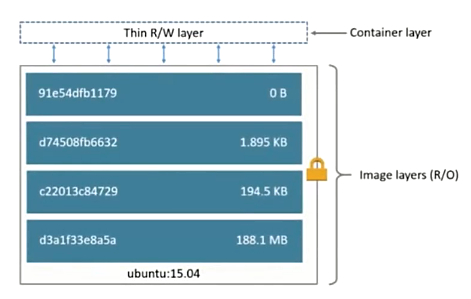
- 通过image创建(copy)
- 在Image layer之上建立一个Container layer(可读写)
- 类比面向对象:类和实例
- Image负责APP的存储和分发,Container负责运行APP
7.2 通过Image创建Container
命令:
docker run
docker run hello-world

Hello from Docker!
This message shows that your installation appears to be working correctly.

To generate this message, Docker took the following steps:
 1. The Docker client contacted the Docker daemon.
 2. The Docker daemon pulled the "hello-world" image from the Docker Hub.
    (amd64)
 3. The Docker daemon created a new container from that image which runs the
    executable that produces the output you are currently reading.
 4. The Docker daemon streamed that output to the Docker client, which sent it
    to your terminal.

To try something more ambitious, you can run an Ubuntu container with:
 $ docker run -it ubuntu bash

Share images, automate workflows, and more with a free Docker ID:
 https://hub.docker.com/

For more examples and ideas, visit:
 https://docs.docker.com/engine/userguide/
docker run启动容器的背后
docker run启动容器时,docker在后台一共做了下面这些事:
- 检查本地是否存在指定的镜像,不存在就从共有仓库下载;
- 利用镜像创建一个容器,并启动该容器;
- 分配一个文件系统给容器,并在只读的镜像层外面挂载一层可读写层;
- 从宿主主机配置的网桥接口中桥接一个虚拟接口到容器中;
- 从网桥的地址池配置一个IP地址给容器;
- 执行用户指定的应用程序;
- 执行完毕后,容器被终止。