Eclipse配置
1.关闭Validation
方位。“Window”–“Preferences”–“Validation”–“Disable All”
2.关闭部分开机插件
方位。“Window”–“Preferences”–“General”–“Startup and Shutdown”
3.代码提示
方位Window -> Preferences -> Java -> Editor -> Content Assist -> Auto Activation
加上”.abcdefghijklmnopqrstuvwxyz”
4自定义新建文件,菜单
方位:Windows->Perspective->CustomizePerspective,选择new,选择shortcut
5文件编码
Preference->General->workspace
对于JSP文件,Preference->Web->JSP Files
6.Properties 文件乱码
Window -> Preferences -> General -> Content Types -> Text -> Java Properties File -> UTF-8 -> Update -> OK
7删除多余工作空间
方位。“Window”–“Preferences”–“General”–“Startup and Shutdown” 选择workspace
其他配置
1.访问项目的时候使用根路径访问,
也就使用http://localhost/访问原来的http://localhost/hello,hello是项目名。
开发的时候:双击Server tab下的

在点击“Modules”,针对第一个修改
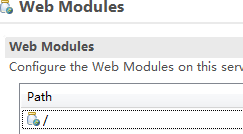
把Path中/hello改成/
发布的时候
修改conf/server.xml文件,找到Host标签,