前不久公司拓展海外市场,要接入google支付。刚开始一头雾水,相关的文档实在太少。而且很多东西都需要翻墙,不过好在摸索几天后,总算调试通了。
前提:翻墙
1、注册账号google账号
https://accounts.google.com/SignUp
2、注册googleplay开发者账号
https://play.google.com/apps/publish/signup/
这一步骤需要Google账号和带有Visa或Master等标志的银行卡或者信用卡,资费25美元
3、新建auth2.0应用
登陆 Google Developer Console,地址:https://code.google.com/apis/console/ 在APIs & auth 项中找到 Credentials,点击创建一个auth2.0 的web应用。其中callback的地址一定是可用域名 + /oauth2callback
创建完后,可以获得,client_id, client_secret, redirect_uri

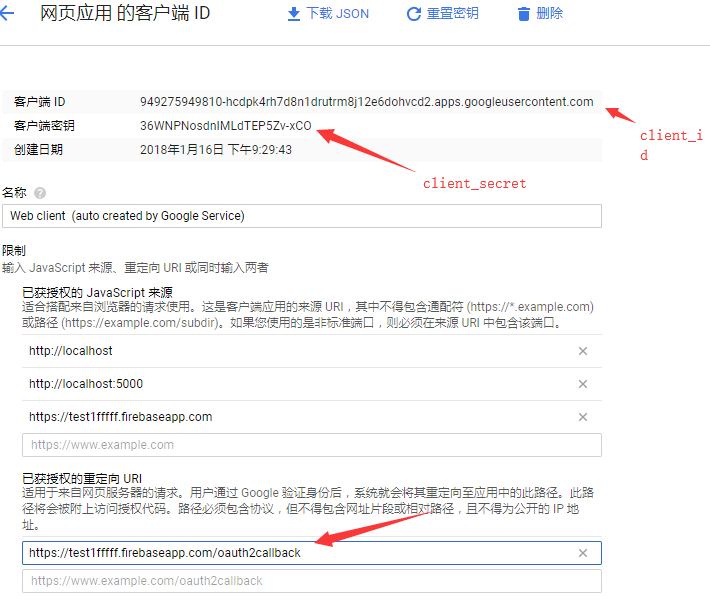
4、get请求获取code
参数:
scope=https://www.googleapis.com/auth/androidpublisher
response_type=code access_type=offline redirect_uri=上一步获取的 client_id=上一步获取的
浏览器访问:https://accounts.google.com/o/oauth2/auth?scope=https://www.googleapis.com/auth/androidpublisher&response_type=code&access_type=offline&redirect_uri=https://test1fffff.firebaseapp.com/oauth2callback/oauth2callback&client_id=816630003638-5p27m684jfpfa6sh6l9chbpreq2hg9ov.apps.googleusercontent.com
获得:https://test1fffff.firebaseapp.com/oauth2callback/oauth2callback?code=4/CpVOd8CljO_gxTRE1M5jtwEFwf8gRD44vrmKNDi4GSS.kr-GHuseD-oZEnp6UADFXm0E0MD3FlAI
该步骤获得code=4/CpVOd8CljO_gxTRE1M5jtwEFwf8gRD44vrmKNDi4GSS.kr-GHuseD-oZEnp6UADFXm0E0MD3FlAI
5、利用code 获取refresh_token (post请求)
地址: $refresh_token_url="https://accounts.google.com/o/oauth2/token";
请求参数:
$data_tmp1 = array(
            'grant_type'=>'authorization_code',
            'code'=>'',//上一步获取的
            'client_id'=>'',//第三步获取
            'client_secret'=>'',//第三步获取
            'redirect_uri'=>'',//第三步获取
        );
$http = new http($refresh_token_url,'POST',5);
$http->setContent($data_tmp1);
$results = $http->exec();
echo $results;
会得到这样一个东西:
{
"access_token" : "",
"token_type" : "Bearer",
"expires_in" : 3600,
"refresh_token" : ""
}
注意:这个refresh_token只会返回一次,后面不会在有,一定要好好保存。
这一步也需要翻墙的,如果在linux上可直接用
curl -d "grant_type=authorization_code&code=4/AA96BteP0IlQj4DW48_2Uw8nVCyAWXswO1FvLftI09q1aomYPaxEo5urHY_Ij9VxKDoNh8rs6cIS8&client_id=5781114-v6f89h1jdlfnsou0ic53m5tie.apps.gooleusercontent.com&client_secret=wKsknqxSxwLPEBvirF&redirect_uri=https://test1fffff.firebaseapp.com" "https://accounts.google.com/o/oauth2/token"
6、最后就可以开始写验证脚本了
 1 public function JpGooglePay(){
 2         $google_public_key    = "你的公钥(google后台在你的应用下获取)";
 3         $inapp_purchase_data  = $_REQUEST['signtureTemp'];
 4         $inapp_data_signature = $_REQUEST['signtureDataTemp'];
 5         $key        = "-----BEGIN PUBLIC KEY-----
".chunk_split($google_public_key, 64,"
").'-----END PUBLIC KEY-----';
 6         $key        = openssl_pkey_get_public($key);
 7         $signature  = base64_decode($inapp_data_signature);
 8         $ok         = openssl_verify($inapp_purchase_data,$signature,$key,OPENSSL_ALGO_SHA1);
 9         if (1 == $ok) {
10             // 支付验证成功!
11             //进行二次验证,订单查询
12
13             // 1.获取access_token(3600秒有效期)
14             $access_token_url = "https://accounts.google.com/o/oauth2/token";
15             $data_tmp2 = array(
16                 'grant_type'=>'refresh_token',
17                 'refresh_token'=>'',//长效token
18                 'client_id'=>'',    //客户端id
19                 'client_secret'=>'',//客户端密钥
20                 );
21             $http = new http($access_token_url,'POST',5);
22             $http->setContent($data_tmp2);
23             $result = $http->exec();
24             $result = json_decode($contents,true);
25             $access_token = $result['access_token'];
26             //2.通过获得access_token 就可以请求谷歌的API接口,获得订单状态
27             $packageName=""//包名
28             $productId="" //产品Id
29             $purchaseToken=""
30             $url = "https://www.googleapis.com/androidpublisher/v2/applications/{$packageName}/purchases/products/{$productId}/tokens/{$purchaseToken}?access_token={$access_token}";
31             $http = new http($url,'GET',5);
32             $http->setContent($data);
33             $contents = $http->exec();
34             $contents = json_decode($contents,true);
35             if($contents['consumptionState'] == 0 && $contents['purchaseState'] == 0){
36                 //验证成功  购买成功并且没有消耗  google支付中客户端如果没有进行消耗是不能再次购买该商品
37                 //处理游戏逻辑 发钻石,通知客户端进行消耗
38             }else{
39                 //订单验证失败
40             }
41         }else{
42             //签名验证失败
43
44         }
45     }