最近做了个功能,DataGrid显示具体内容的时候,根据某列分组。
每个分组具体内容后边,增加一行显示合计信息。
查询数据时,使用了union all将分组数据与明细数据合并起来,使用了排序达到了预期的效果。
绑定数据的时候,为了合计行比较醒目,所以把合并行加粗了,合计列居中。
界面如下图:
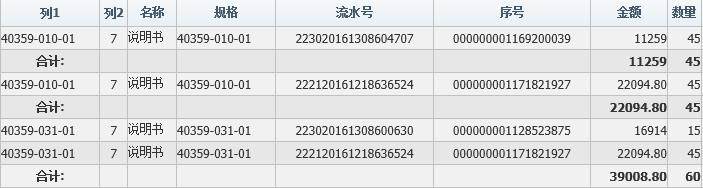
DataGrid前台:
1 <asp:DataGrid ID="dgList" DataKeyField="ID" runat="server" AutoGenerateColumns="False" OnItemDataBound="dgList_ItemDataBound">
2                                         <Columns>
3                                             <asp:TemplateColumn HeaderText="列1">
4                                                 <ItemTemplate>
5                                                     <asp:Label ID="lab_COP_G_NO" runat="server" Text='<%#Eval("COP_G_NO") %>'></asp:Label>
6                                                 </ItemTemplate>
7                                             </asp:TemplateColumn>
DataGrid后台ItemDataBound方法:
 1 protected void dgList_ItemDataBound(object sender, DataGridItemEventArgs e)
 2         {
 3             if (e.Item.ItemType == ListItemType.Item || e.Item.ItemType == ListItemType.AlternatingItem)
 4             {
 5                 Label lab_COP_G_NO = (Label)e.Item.FindControl("lab_COP_G_NO");
 6                 if (lab_COP_G_NO.Text == "合计:")
 7                 {
 8                     e.Item.Font.Bold = true;
 9
10                     ((TableCell)lab_COP_G_NO.Parent).HorizontalAlign = HorizontalAlign.Center;
11                 }
12             }
13         }
根据列1内容判断,是"合计:",行加粗显示e.Item.Font.Bold = true;
合计列剧中显示((TableCell)lab_COP_G_NO.Parent).HorizontalAlign = HorizontalAlign.Center;
推荐e.Item.FindControl这种写法,前台使用模板列,这样前台调整列的先后顺序不影响后台的使用。