前言
最近在研究图片滑动解锁 登录,说是要用阿里的那个验证,但是还是想自己手写下这个Demo
效果图是这样的:
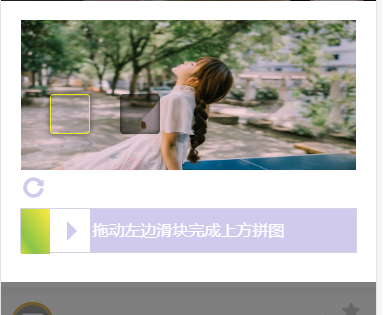
本来是想用canvas 来实现的,但是类,后来还想用css 和图片来代替canvas
其实思路就这样的:
那个缺陷的滑块位置 是随机的 根据 图片的宽高 产生 随机 数当然是定位 : left,top.,然后距离最左边的距离 moveToLeft,
最后滑动的距离和这个距离作比较,看看是否相等 。。然后就好了......
vue 中滑动开始 start 开始计算时间 - 》 想右滑动的距离等于滑块滑动的距离
思路其实也不难,就放上代码吧:
<template>
   <section class="code_bg">
      <div class="slide-box">
          <div class="slide-img-block">
            <div class="slide-img-div">
                <div class="slide-img-nopadding">
                  <img class="slide-img" id="slideImg" :src="img">
                  <div class="slide-block" id="slideBlock"></div>
                  <div class="slide-box-shadow" id="cutBlock"></div>
                </div>
            </div>
          </div>
          <div class="scroll-background  slide-img-hint-info" id="slideHintInfo" style="height: 0px;">
              <div class="slide-img-hint">
                  <div class="scroll-background slide-icon" id="slideIcon"></div>
                  <div class="slide-text">
                    <span class="slide-text-type greenColor" id="slideType">验证通过:</span>
                    <span class="slide-text-content" id="slideContent">用时0.4s</span>
                  </div>
              </div>
          </div>
          <i class="iconfont icon-refresh" @click="resImg"></i>
          <!-- 滑块 -->
          <div class="slideBox" ref="slideBox">
              <div class='slide'
                @touchstart="touchStart($event)"
                @touchmove="touchMove($event)"
                @touchend="touchEnd($event)" :style="{'left':moveToLeft+'px'}" ref="slide">
                <i class="iconfont "></i></div>
              <div class="slideBg" :style="{'width':moveToLeft+'px'}"></div>
              <div class="textBg" v-show="moveToLeft>0">拖动左边滑块完成上方拼图</div>
              <span class="default"  v-show="moveToLeft===0">拖动左边滑块完成上方拼图</span>
          </div>
      </div>
   </section>
</template>

<script>
export default {
  name: "slideBox",
  data() {
    return {
      msg: "滑动",
      moveToLeft: 0, //滑动距离
      starX: 0, //初始距离
      slideBoxWidth: 0,
      slideWidth: 0,
      resultX: "",
      slideBlock: "",
      cutBlock: "",
      imgWidth: "",
      imgHeight: "",
      slideIcon: "", // 图标
      slideType: "", // 失败
      slideContent: "", //正文
      slideHintInfo: "", //弹出
      isSuccess: true,
      startTamp: "", //开始时间
      endTamp: "", //结束时间
      timer: "", // 用时解开
      img: "", // 图片
      imgList: [
        "http://www.keaitupian.net/uploads/allimg/170120/1A12A959-0.jpg",
        "http://www.keaitupian.net/uploads/allimg/150409/15124TD2-3.jpg",
        "http://www.keaitupian.net/uploads/allimg/150409/15124U2E-0.jpg",
        "http://www.keaitupian.net/uploads/allimg/150409/15124RI8-4.jpg",
        "http://www.keaitupian.net/uploads/allimg/170120/1A5142649-1.jpg",
        "http://www.keaitupian.net/uploads/allimg/161207/1_161207173815_3.jpg",
        "http://www.keaitupian.net/uploads/allimg/161207/1_161207173815_4.jpg",
        "http://www.keaitupian.net/uploads/allimg/160804/09321051Z-0.jpg",
        "http://www.keaitupian.net/uploads/allimg/160804/0932105013-1.jpg"
      ]
    };
  },
  mounted() {
    let _this = this;
    setTimeout(() => {
      this.$loading.close();
    }, 500);
    _this.slideBoxWidth = _this.$refs.slideBox.clientWidth;
    _this.slideWidth = _this.$refs.slide.clientWidth;
    _this.cutBlock = document.getElementById("cutBlock"); // 裁剪区域
    _this.slideBlock = document.getElementById("slideBlock"); // 裁剪的图片
    _this.imgWidth = document.getElementById("slideImg").offsetWidth; // 图片宽
    _this.imgHeight = document.getElementById("slideImg").offsetHeight; // 图片高
    _this.slideIcon = document.getElementById("slideIcon"); // 正确、失败的图标
    _this.slideType = document.getElementById("slideType"); // 正确、失败
    _this.slideContent = document.getElementById("slideContent"); // 正确、失败的正文
    _this.slideHintInfo = document.getElementById("slideHintInfo"); // 弹出
    _this.resImg();
  },
  methods: {
    touchStart(e) {
      let _this = this;
      console.log("zzzz:" + e.targetTouches[0].pageX);
      let starX = e.targetTouches[0].pageX;
      _this.starX = starX;
      _this.startTamp = new Date().valueOf();
      if (_this.isSuccess) {
        _this.cutImg();
      }
    },
    touchMove(e) {
      let _this = this;
      console.log("yyyy:" + e.targetTouches[0].pageX);

      let ToLeft = e.targetTouches[0].pageX - _this.starX; //变化后的坐标减去初始坐标
      let slideBoxW = Math.floor(_this.slideBoxWidth - _this.slideWidth - 1); //计算大盒子宽度
      if (ToLeft < 0) {
        ToLeft = 0; //滑块不能超出大盒子左边
        _this.slideBlock.style.left = "0px";
      }
      if (ToLeft >= 0 && ToLeft <= slideBoxW) {
        _this.slideBlock.style.left = ToLeft + "px";
      }

      if (ToLeft > slideBoxW) {
        ToLeft = slideBoxW; //滑块不能超出大盒子右边
      }
      _this.moveToLeft = ToLeft;
      console.log("离开的" + _this.resultX);
    },
    touchEnd() {
      let _this = this;
      let ToLeft = _this.moveToLeft;
      if (_this.resultX > ToLeft - 4 && _this.resultX < ToLeft + 4) {
        _this.isSuccess = true;
        _this.endTamp = new Date().valueOf();
        _this.timer = ((_this.endTamp - _this.startTamp) / 1000).toFixed(1);
        // 裁剪图片(拼图的一块)
        _this.slideBlock.style.opacity = "0";
        // _this.slideBlock.style.transition = "opacity 0.6s";
        // 裁剪的区域(黑黑的那一块)
        _this.cutBlock.style.opacity = "0";
        _this.cutBlock.style.transition = "opacity 0.6s";
        // 正确弹出的图标
        _this.slideType.className = "slide-text-type greenColor";
        _this.slideType.innerHTML = "验证通过:";
        _this.slideContent.innerHTML = "用时" + _this.timer + "s";
        setTimeout(function() {
          _this.cutBlock.style.display = "none";
          _this.slideBlock.style.left = "0px";
          //_this.reToNewImg();
          _this.$toast({
            message: "验证通过"
          });
        }, 600);
        //_this.options.success && _this.options.success();
      } else {
        _this.isSuccess = false;
        // 设置样式
        // 裁剪图片(拼图的一块)
        _this.slideBlock.style.left = "0px";
        // 错误弹出的图标

        _this.slideType.className = "slide-text-type redColor";
        _this.slideType.innerHTML = "验证失败:";
        _this.slideContent.innerHTML = "拖动滑块将悬浮图像正确拼合";
        _this.slideBlock.style.left = "0px";
        _this.resImg();
      }
      // 设置样式
      _this.slideHintInfo.style.height = "22px";
      setTimeout(function() {
        _this.slideHintInfo.style.height = "0px";
      }, 1300);
      //离开的时候回到初始位置
      _this.moveToLeft = 0;
    },
    cutImg() {
      var _this = this;
      _this.cutBlock.style.display = "block";
      var cutWidth = _this.cutBlock.offsetWidth; // 裁剪区域宽
      var cutHeight = _this.cutBlock.offsetHeight; // 裁剪区域高
      // left
      _this.resultX = Math.floor(
        Math.random() * (_this.imgWidth - cutWidth * 2 - 4) + cutWidth
      );
      // top
      var cutTop = Math.floor(
        Math.random() * (_this.imgHeight - cutHeight * 2) + cutHeight
      );
      // 设置样式
      _this.cutBlock.style.cssText =
        "top:" +
        cutTop +
        "px;" +
        "left:" +
        _this.resultX +
        "px; display: block;";
      _this.slideBlock.style.top = cutTop + "px";
      _this.slideBlock.style.backgroundPosition =
        "-" + _this.resultX + "px -" + cutTop + "px";
      _this.slideBlock.style.opacity = "1";
    },
    resImg() {
      let _this = this;
      _this.isSuccess = true;
      let newImg = _this.imgList[Math.round(Math.random() * 8)];
      _this.img = newImg;
      _this.slideBlock.style.backgroundImage = "url(" + newImg + ")";
      _this.slideBlock.style.opacity = "0";
      _this.cutBlock.style.display = "none";
    }
  }
};
</script>

<style lang="scss" scoped>

// 上面的滑块
.code_bg {
  position: fixed;
  top: 0;
  left: 0;
  right: 0;
  bottom: 0;
  background-color: rgba(0, 0, 0, 0.5);
  z-index: 20;
  // 图片
  .slide-box {
    display: block;
    position: relative;
    top: 25%;
    background: #fff;
    padding: 5% 0;
    .slide-btn {
      height: 44px;
      width: 44px;
      background-position: 0 -84px;
      cursor: pointer;
      display: block;
      position: absolute;
      left: 0;
      top: -9px;
      -moz-box-shadow: none;
      box-shadow: none;
      border-radius: 13px;
      z-index: 399;
    }
    .icon-refresh {
      display: block;
      font-size: 0.4rem;
      margin-left: 6%;
      margin-top: 1%;
      color: #d0caec;
    }
    .slide-img-div {
      width: 100%;
      height: 3rem;
      padding: 0 5%;
      position: relative;
      border-left: 1px solid #fff;
      border-right: 1px solid #fff;
      img {
        width: 100%;
        height: 100%;
      }
      .slide-box-shadow {
        display: none;
        position: absolute;
        width: 0.8rem;
        height: 0.8rem;
        border-radius: 4px;
        background-color: rgba(0, 0, 0, 0.3);
        box-shadow: 0 0 10px 0 rgba(0, 0, 0, 0.8) inset;
      }
      .slide-block {
        opacity: 0;
        position: absolute;
        top: 0;
        left: 2px;
        width: 0.8rem;
        height: 0.8rem;
        border-radius: 0.08rem;
        background-repeat: no-repeat;
        background-attachment: scroll;
        border: 1px solid rgba(255, 255, 0, 0.8);
        background-size: 100% 3rem;
        box-shadow: 0 0 10px 0 rgba(0, 0, 0, 0.4),
          0 0 10px 0 rgba(90, 90, 90, 0.4);
        box-sizing: border-box;
        z-index: 10;
      }
      .slide-img-nopadding {
        position: relative;
        width: 100%;
        height: 100%;
      }
    }
    .slide-icon {
      float: left;
      height: 22px;
      width: 26px;
    }
    .slide-img-hint {
      -webkit-font-smoothing: subpixel-antialiased;
      font-size: 12px !important;
      line-height: 22px !important;
      margin: 0 auto;
      position: relative;
    }
    .slide-text {
      text-align: left !important;
      color: #4b3f33;
    }
    .slide-img-hint-info {
      height: 22px;
      width: 260px;
      background-position: 0 -674px;
      height: 0;
      overflow: hidden;
      position: absolute;
      bottom: 1px;
      transition: height 0.3s;
      z-index: 11;
    }
    .redColor {
      color: red;
    }
    .greenColor {
      color: green;
    }
  }
  // 滑块
  .slideBox {
    z-index: 20;
    height: 0.89rem;
    border: 1px solid #d5d3e2;
    margin: 0.1rem 0 0.2rem 0;
    line-height: 0.89rem;
    background: #d0caec;
    color: #fff;
    font-size: 16px;
    position: relative;
    top: 30%;
    width: 90%;
    left: 5%;
    .slide {
      height: .86rem;
      width: 0.8rem;
      background: #fff;
      position: absolute;
      top: 0px;
      left: 0;
      i {
        width: 0;
        height: 0;
        border-width: 10px;
        border-style: dashed dashed dashed solid;
        border-color: transparent transparent transparent #d0caec;
        position: absolute;
        top: 50%;
        left: 50%;
        margin: -0.2rem 0 0 -0.05rem;
      }
    }
    .slideBg {
      height: 0.89rem;
      background: linear-gradient(
        to top right,
        #cddc39 0%,
        #8bc34a 25%,
        #ffeb3b 100%
      );
    }
    .textBg {
      height: 0.89rem;
      width: 100%;
      text-align: center;
      position: absolute;
      top: 0;
    }
    .default {
      height: 0.89rem;
      position: absolute;
      top: 0;
      left: 15%;
      width: 70%;
      text-align: center;
    }
  }
}
</style>
好啦 ,就先这样吧