MySQL报错总结

报错原因:/application/mysql-5.6.44/tmp不存在

解决方法:mkdir /application/mysql-5.6.44/tmp

报错原因: /application/mysql-5.6.44/存放socket 目录没有权限

解决方法:chown -R mysql.mysql /application/mysql-5.6.44/
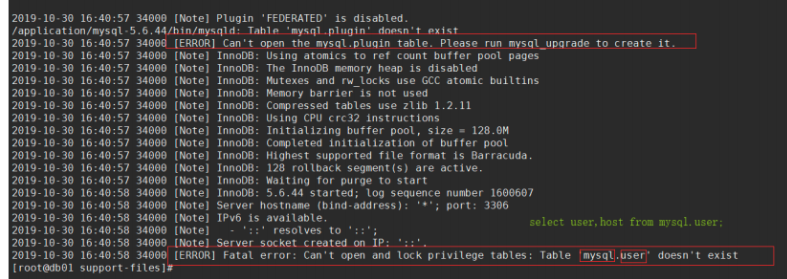
报错原因:mysql库中的user表找不到

解决方法:初始化MySQL数据库
报错1
FATAL ERROR: please install the following Perl modules before executing ./mysql_install_db:
Data::Dumper

原因
[root@db02 scripts]# yum install-y autoconf
即可

[root@db01 scripts]# /etc/init.d/mysqld start
Starting MySQL.. ERROR! The server quit without updating PID file (/application/mysql-5.6.44/data/db01.pid).


解决:
 yum install -y libaio-devel
 yum install -y perl-devel
报错2
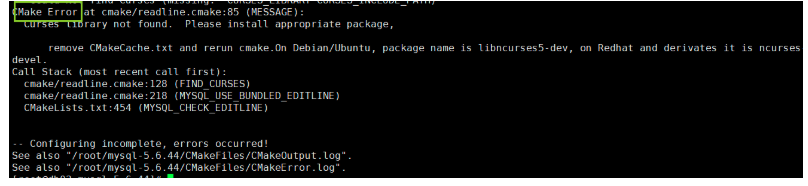
CMake Error at cmake/readline.cmake:85 (MESSAGE):
  Curses library not found.  Please install appropriate package,

      remove CMakeCache.txt and rerun cmake.On Debian/Ubuntu, package name is libncurses5-dev, on Redhat and derivates it is ncurses-devel.
Call Stack (most recent call first):
  cmake/readline.cmake:128 (FIND_CURSES)
  cmake/readline.cmake:218 (MYSQL_USE_BUNDLED_EDITLINE)
  CMakeLists.txt:454 (MYSQL_CHECK_EDITLINE)


-- Configuring incomplete, errors occurred!
See also "/root/mysql-5.6.44/CMakeFiles/CMakeOutput.log".
See also "/root/mysql-5.6.44/CMakeFiles/CMakeError.log".
解决
1.  yum install -y ncurses-devel
2.  rm -rf  CMakeCache.txt
3. 再次执行一下
[root@db03 mysql-5.6.44]# echo $?
0
代表就可以了
报错3
解决
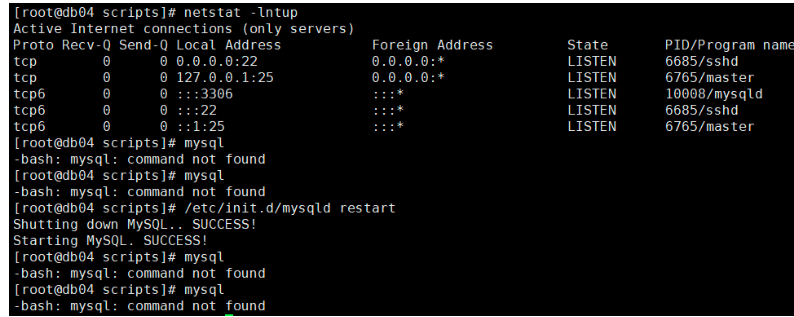
问题,就是编译安装好后,输入mysql 报-bash: mysql: command not found
原因没有添加变量

[root@db01 scripts]# vim /etc/profile.d/mysql.sh
export PATH="/opt/mysql/bin:$PATH"
#加载环境变量
[root@db01 scripts]# source /etc/profile
#查看所有的环境变量
[root@db01 scripts]# echo $PATH
/opt/mysql/bin:/usr/local/sbin:/usr/local/bin:/usr/sbin:/usr/bin:/root/bin

#检查端口
[root@db01 scripts]# netstat -lntup
tcp6       0      0 :::3306                 :::*                    LISTEN      34209/mysqld
报错4

原因:
没有安装依赖libaio-deve
yum install -y libaio-deve 即可
报错5

解决
1.回到 cd mysql-5.6.44
2.然后把rm -rf  CMakeCache.txt
3.cmake . -DCMAKE_INSTALL_PREFIX=/opt/mysql-5.6.44 -DMYSQL_DATADIR=/opt/mysql-5.6.44/data -DMYSQL_UNIX_ADDR=/opt/mysql-5.6.44/tmp/mysql.sock -DDEFAULT_CHARSET=utf8 -DDEFAULT_COLLATION=utf8_general_ci -DWITH_EXTRA_CHARSETS=all -DWITH_INNOBASE_STORAGE_ENGINE=1 -DWITH_FEDERATED_STORAGE_ENGINE=1 -DWITH_BLACKHOLE_STORAGE_ENGINE=1 -DWITHOUT_EXAMPLE_STORAGE_ENGINE=1 -DWITH_ZLIB=bundled -DWITH_SSL=bundled -DENABLED_LOCAL_INFILE=1 -DWITH_EMBEDDED_SERVER=1 -DENABLE_DOWNLOADS=1 -DWITH_DEBUG=0

4.make
5.make install
6.cp mysql.server /etc/init.d/mysqld
7.cp my-default.cnf /etc/my.cnf
8. mkdir /opt/mysql-5.6.44/tmp
8.ln -s /opt/mysql-5.6.44 /opt/mysql
9. chown -R mysql.mysql /opt/*
10. cd /opt/mysql-5.6.44/scripts
11.  yum install -y autoconf
12./mysql_install_db --user=mysql --basedir=/opt/mysql --datadir=/opt/mysql/data
13. echo $?
   返回0 就可以了
14. /etc/init.d/mysqld start
报错6
启动多实例3309的时候发现3309 起不来,
原因是内存不够,要加到2G或以上
