表格是我们在制作文档时,经常使用的一个元素。对布局的控制非常精确。在ITextSharp中表格对象是下面两个元素:
PdfTable,PdfCell
下面从ITextSharp In Action截取一段代码:
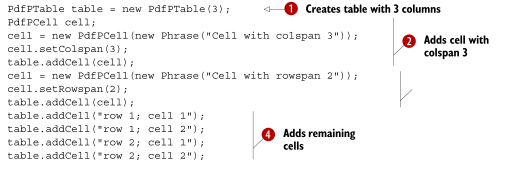
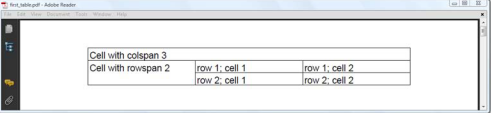
从代码中,可以看出,PdfTable的构造函数,传入一个列数为参数,表示这个表格有多少列,往表格中加入PdfCell,如果加入的单元格超过一行,自动会进行换行。单元格中有一个setColspan函数(注:C#版本中,是属性Colspan),用于设置一个单元格跨多列。同样,如果要跨越多行,也有一个属性(C#)RolSpan,上面的演示代码执行结果如下:
PdfTable对象有一个设置表格区域和每列宽度的函数,如下:
public void SetTotalWidth(float[] columnWidth);
public void SetWidthPercentage(float[] columnWidth, Rectangle pageSize);
属性:HorizontalAlignment 设置表格的对齐方式
HeaderRows 表示第几行作为表格头
FooterRows 表示第几行作为表格尾
SplitLate 表示单元格是否跨页显示
SplitRows 表示行是否跨页显示
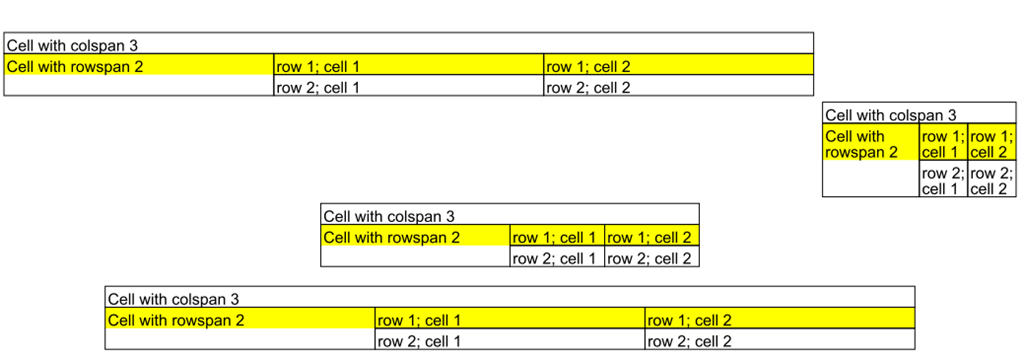
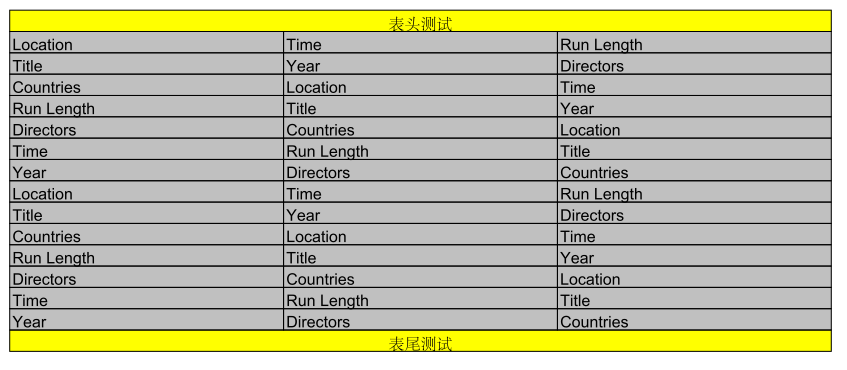
示例代码如下:
1: public class PdfPTableDemo : TestBase
2: {
3: protected override void Opening(Document document, PdfWriter writer)
4: {
5: document.SetPageSize(PageSize.A4.Rotate());
6: base.Opening(document, writer);
7: }
8: protected override void WriteDocument(Document document, PdfWriter writer)
9: {
10: PdfPTable table = CreateTable();
11: //table.WidthPercentage = 80;//设置表格占的宽度,百分比
12: //table.TotalWidth = 200;//设置表格占的宽度,单位点数
13: //table.SetTotalWidth();
14: //table.SetWidthPercentage();
15: table.HorizontalAlignment = Element.ALIGN_LEFT;
16: document.Add(table);
17:
18: table = CreateTable();
19: table.HorizontalAlignment = Element.ALIGN_RIGHT;
20: table.SpacingBefore = (5);
21: table.SpacingAfter = (5);
22: Rectangle rect = new Rectangle(523, 770);
23: table.SetWidthPercentage(
24: new float[] { 50, 25, 25 }, rect);
25: document.Add(table);
26: table = CreateTable();
27: table.HorizontalAlignment = Element.ALIGN_CENTER;
28: table.SetTotalWidth(new float[] { 144, 72, 72 });
29: table.LockedWidth = (true);
30: document.Add(table);
31: table = CreateTable();
32: table.SpacingBefore = (15);
33: table.SpacingAfter = (15);
34: document.Add(table);
35:
36: table = new PdfPTable(3);
37: PdfPCell cell
38: = new PdfPCell(new Phrase("表头测试", Normal));
39: cell.BackgroundColor = (BaseColor.YELLOW);
40: cell.HorizontalAlignment = (Element.ALIGN_CENTER);
41: cell.Colspan = (7);
42: table.AddCell(cell);
43:
44: cell
45: = new PdfPCell(new Phrase("表尾测试", Normal));
46: cell.BackgroundColor = (BaseColor.YELLOW);
47: cell.HorizontalAlignment = (Element.ALIGN_CENTER);
48: cell.Colspan = (7);
49: table.AddCell(cell);
50:
51: table.DefaultCell.BackgroundColor = (BaseColor.LIGHT_GRAY);
52: for (int i = 0; i < 100; i++)
53: {
54: table.AddCell("Location");
55: table.AddCell("Time");
56: table.AddCell("Run Length");
57: table.AddCell("Title");
58: table.AddCell("Year");
59: table.AddCell("Directors");
60: table.AddCell("Countries");
61: }
62: table.DefaultCell.BackgroundColor = (null);
63: table.HeaderRows = (2);
64: table.FooterRows = (1);
65: document.Add(table);
66:
67: }
68:
69: private PdfPTable CreateTable()
70: {
71: PdfPTable table = new PdfPTable(3);
72: table.TableEvent = new AlternatingBackground();
73: //table.WidthPercentage = 80;//设置表格占的宽度,百分比
74: //table.TotalWidth = 200;//设置表格占的宽度,单位点数
75: //table.SetTotalWidth();
76: //table.SetWidthPercentage();
77: PdfPCell cell;
78: cell = new PdfPCell(new Phrase("Cell with colspan 3"));
79: cell.Colspan = (3);
80: table.AddCell(cell);
81: cell = new PdfPCell(new Phrase("Cell with rowspan 2"));
82: cell.Rowspan = (2);
83: table.AddCell(cell);
84: table.AddCell("row 1; cell 1");
85: table.AddCell("row 1; cell 2");
86: table.AddCell("row 2; cell 1");
87: table.AddCell("row 2; cell 2");
88:
89: return table;
90: }
91: }
92:
2011-07-14
补充一点:在设置单元格的对齐方式时,应该选设置对齐方式,再来添加内容。
1: cell = new PdfPCell(new Chunk("中国人民",Normal));
2: cell.UseAscender = (true);
3: cell.UseDescender = (true);
4: cell.VerticalAlignment = Element.ALIGN_MIDDLE;
5: cell.HorizontalAlignment = Element.ALIGN_CENTER;
7: table.AddCell(cell);