原文出自:https://www.cnblogs.com/tlz888/p/6879227.html
【提要】win平台上,python2.7官网的安装包在安装后不会添加环境变量且不会把安装信息写入注册表。
把python和pip的安装路径添加到环境变量是做python开发必要的一步,而写入注册表的原因是,有些python包以
windows installer的形式安装,安装的时候需要用到python的注册表信息,比如,numpy, scipy。
安装步骤:
(1)到python官网下载安装包,www.python.org/downloads,运行安装;
(2)把python.exe所在路径(python安装路径)以及pip.exe路径(python安装路径下的Script文件加)添加到path环境变量。
比如我的python在这里:“C:Python27”,那么添加路径:“C:Python27”和“C:Python27Scripts”到path环境变量;
(3)在注册表中添加python注册信息,用于python可以操作windows的注册表,可以运行python文件来完成此步操作,
以下为python源码,把它拷贝出来,放在任意位置,用python运行即可。
import sys


from _winreg import *

# tweak as necessary
version = sys.version[:3]
installpath = sys.prefix
regpath = "SOFTWARE\Python\Pythoncore\%s\" % (version)
installkey = "InstallPath"
pythonkey = "PythonPath"
pythonpath = "%s;%s\Lib\;%s\DLLs\" % (
installpath, installpath, installpath
)

def RegisterPy():
    print "begin RegisterPy "
    try:
        print "open key : %s"%regpath
        reg = OpenKey(HKEY_CURRENT_USER, regpath)
    except EnvironmentError as e:
        try:
            reg = CreateKey(HKEY_CURRENT_USER, regpath)
            SetValue(reg, installkey, REG_SZ, installpath)
            SetValue(reg, pythonkey, REG_SZ, pythonpath)
            CloseKey(reg)
        except:
            print "*** EXCEPT: Unable to register!"
            return

        print "--- Python", version, "is now registered!"
        return


    if (QueryValue(reg, installkey) == installpath and
        QueryValue(reg, pythonkey) == pythonpath):
            CloseKey(reg)
            print "=== Python", version, "is already registered!"
            return CloseKey(reg)

    print "*** ERROR:Unable to register!"
    print "*** REASON:You probably have another Python installation!"

def UnRegisterPy():
    #print "begin UnRegisterPy "
    try:
        print "open HKEY_CURRENT_USER key=%s"%(regpath)
        reg = OpenKey(HKEY_CURRENT_USER, regpath)
        #reg = OpenKey(HKEY_LOCAL_MACHINE, regpath)
    except EnvironmentError:
        print "*** Python not registered?!"
        return
    try:
       DeleteKey(reg, installkey)
       DeleteKey(reg, pythonkey)
       DeleteKey(HKEY_LOCAL_MACHINE, regpath)
    except:
       print "*** Unable to un-register!"
    else:
       print "--- Python", version, "is no longer registered!"

if __name__ == "__main__":
    RegisterPy()
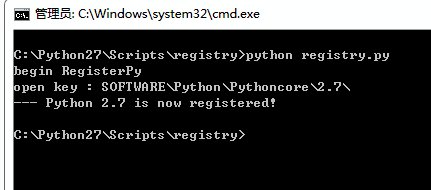
如下图所示,出现Pyhton 2.7 is now registered!字样即为注册成功。
在注册表中也能看到相应的信息:
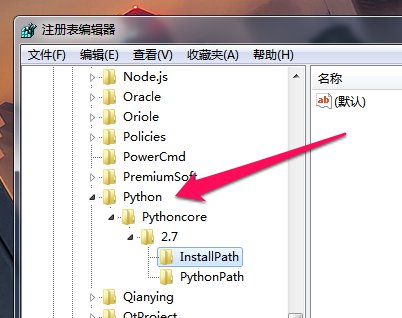
如果由于诸如安装后又卸载了多个版本python的原因导致注册表信息不对,可以直接手动编辑注册表,然后重新注册。
手动在注册表中添加注册信息的方法跟上述python代码中过程一致。