转载:https://blog.csdn.net/sunflover454/article/details/51525179
转载:https://blog.csdn.net/magictong/article/details/40753519
转载:https://blog.csdn.net/ryu2003/article/details/52064494
#include <iostream>
#include <Windows.h>
#include <atlstr.h>

#pragma warning(disable : 4996)

CString GetSystemName()
{
    SYSTEM_INFO info;        //用SYSTEM_INFO结构判断64位AMD处理器
    GetSystemInfo(&info);    //调用GetSystemInfo函数填充结构
    OSVERSIONINFOEX os;
    os.dwOSVersionInfoSize = sizeof(OSVERSIONINFOEX);

    CString osname = L"unknown OperatingSystem.";

    if (GetVersionEx((OSVERSIONINFO *)&os))
    {
        //下面根据版本信息判断操作系统名称
        switch (os.dwMajorVersion)//判断主版本号
        {
        case 4:
            switch (os.dwMinorVersion)//判断次版本号
            {
            case 0:
                if (os.dwPlatformId == VER_PLATFORM_WIN32_NT)
                    osname = L"Microsoft Windows NT 4.0"; //1996年7月发布
                else if (os.dwPlatformId == VER_PLATFORM_WIN32_WINDOWS)
                    osname = L"Microsoft Windows 95";
                break;
            case 10:
                osname = L"Microsoft Windows 98";
                break;
            case 90:
                osname = L"Microsoft Windows Me";
                break;
            }
            break;

        case 5:
            switch (os.dwMinorVersion)   //再比较dwMinorVersion的值
            {
            case 0:
                osname = L"Microsoft Windows 2000";//1999年12月发布
                break;

            case 1:
                osname = L"Microsoft Windows XP";//2001年8月发布
                break;

            case 2:
                if (os.wProductType == VER_NT_WORKSTATION
                    && info.wProcessorArchitecture == PROCESSOR_ARCHITECTURE_AMD64)
                {
                    osname = L"Microsoft Windows XP Professional x64 Edition";
                }
                else if (GetSystemMetrics(SM_SERVERR2) == 0)
                    osname = "Microsoft Windows Server 2003";//2003年3月发布
                else if (GetSystemMetrics(SM_SERVERR2) != 0)
                    osname = L"Microsoft Windows Server 2003 R2";
                break;
            }
            break;

        case 6:
            switch (os.dwMinorVersion)
            {
            case 0:
                if (os.wProductType == VER_NT_WORKSTATION)
                    osname = L"Microsoft Windows Vista";
                else
                    osname = L"Microsoft Windows Server 2008";//服务器版本
                break;
            case 1:
                if (os.wProductType == VER_NT_WORKSTATION)
                    osname = L"Microsoft Windows 7";
                else
                    osname = L"Microsoft Windows Server 2008 R2";
                break;
            case 2:
                if (os.wProductType == VER_NT_WORKSTATION)
                    osname = L"Microsoft Windows 8";
                else
                    osname = L"Microsoft Windows Server 2012";
                break;
            case 3:
                if (os.wProductType == VER_NT_WORKSTATION)
                    osname = L"Microsoft Windows 8.1";
                else
                    osname = L"Microsoft Windows Server 2012 R2";
                break;
            }
            break;

        case 10:
            switch (os.dwMinorVersion)
            {
            case 0:
                if (os.wProductType == VER_NT_WORKSTATION)
                    osname = L"Microsoft Windows 10";
                else
                    osname = L"Microsoft Windows Server 2016 Technical Preview";//服务器版本
                break;
            }
            break;
        }
    }

    return osname;
}


int main()
{
    CString strOSversion = GetSystemName();


    return 0;
}
注:现在系统升级很快,这对软件开发人员来说是个打击,测试起来太麻烦,要考虑的兼容性问题也越来越多,坑也越来越多。。。
虽然核心代码就一个函数:GetVersionEx,但是Win8.1和Win10获取到的版本缺一直是6.2(Win8)
仔细阅读微软说明:https://msdn.microsoft.com/en-us/library/ms724832.aspx
问题的原因:简单讲就是兼容问题。可以通过修改manifest文件解决,也可以采用新的API来获取版本号。
由于新的API在低版本操作系统没有,还要特别处理,我们干脆使用修改manifest文件的方法,提高程序自身的兼容性,从而得到正确的系统版本信息。
<?xml version="1.0" encoding="UTF-8"?>
<assembly xmlns="urn:schemas-microsoft-com:asm.v1" manifestVersion="1.0">
    <compatibility xmlns="urn:schemas-microsoft-com:compatibility.v1">
        <application>
            <!-- Windows 10 -->
            <supportedOS Id="{8e0f7a12-bfb3-4fe8-b9a5-48fd50a15a9a}"/>
            <!-- Windows 8.1 -->
            <supportedOS Id="{1f676c76-80e1-4239-95bb-83d0f6d0da78}"/>
            <!-- Windows Vista -->
            <supportedOS Id="{e2011457-1546-43c5-a5fe-008deee3d3f0}"/>
            <!-- Windows 7 -->
            <supportedOS Id="{35138b9a-5d96-4fbd-8e2d-a2440225f93a}"/>
            <!-- Windows 8 -->
            <supportedOS Id="{4a2f28e3-53b9-4441-ba9c-d69d4a4a6e38}"/>
        </application>
    </compatibility>
</assembly>
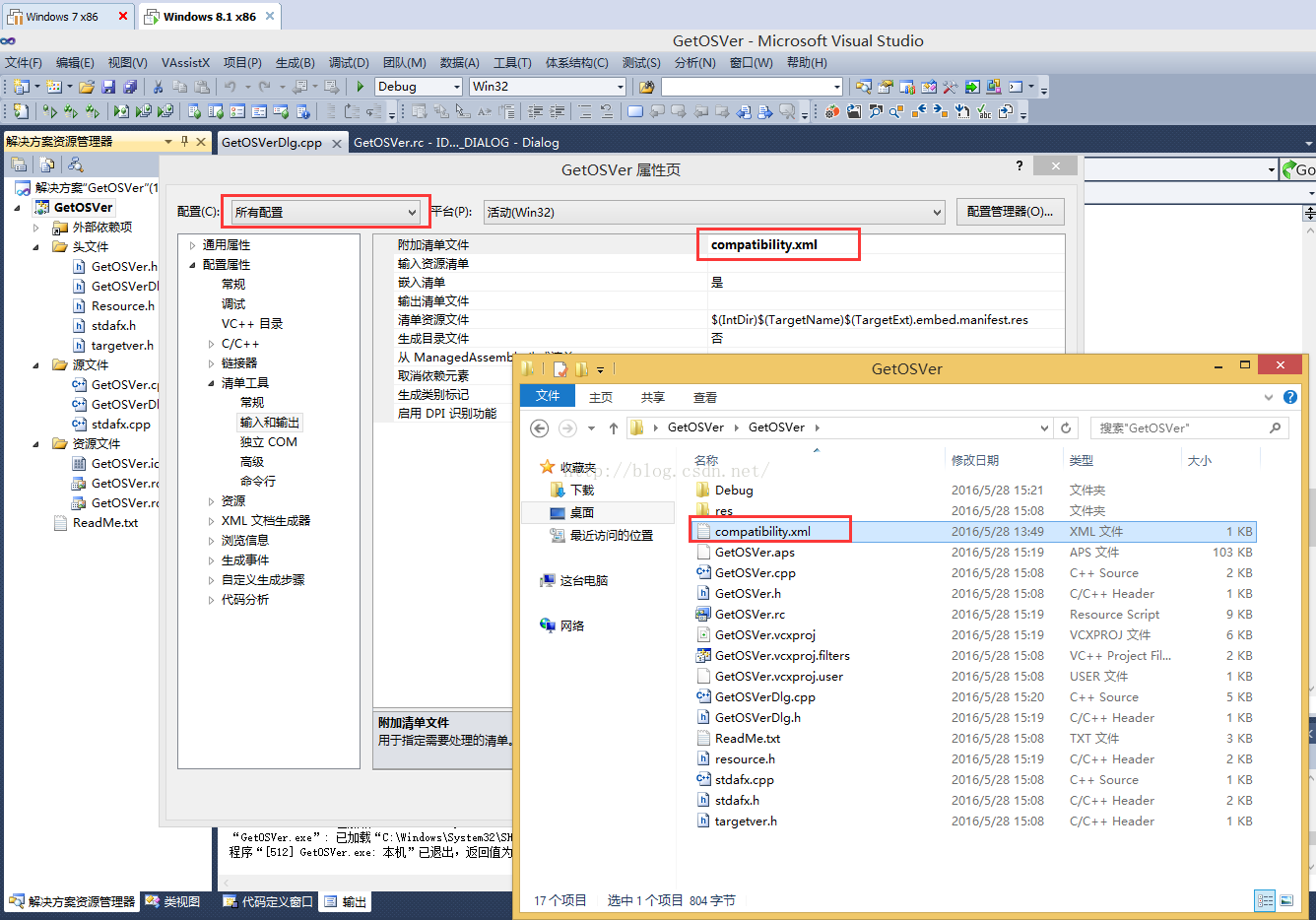
代码不变,只需要把项目属性设置一下就好了
配置目标那里选则所有配置,配置属性->清单工具->输入和输出-附加清单文件 填写compatibility.xml,并把这个文件拷贝到项目源代码目录。
具体设置如下图所示:
2.获取CPU名称、内核数目、主频
转载:https://blog.csdn.net/github_37567324/article/details/79925776
#include <iostream>
#include <Windows.h>

void GetCpuInfo(CString &chProcessorName, CString &chProcessorType, DWORD &dwNum, DWORD &dwMaxClockSpeed)
{
    CString strPath = _T("HARDWARE\DESCRIPTION\System\CentralProcessor\0");//注册表子键路径
    CRegKey regkey;//定义注册表类对象
    LONG lResult;//LONG型变量-反应结果
    lResult = regkey.Open(HKEY_LOCAL_MACHINE, LPCTSTR(strPath), KEY_ALL_ACCESS); //打开注册表键
    if (lResult != ERROR_SUCCESS)
    {
        return;
    }
    WCHAR chCPUName[50] = { 0 };
    DWORD dwSize = 50;

    //获取ProcessorNameString字段值
    if (ERROR_SUCCESS == regkey.QueryStringValue(_T("ProcessorNameString"), chCPUName, &dwSize))
    {
        chProcessorName = chCPUName;
    }

    //查询CPU主频
    DWORD dwValue;
    if (ERROR_SUCCESS == regkey.QueryDWORDValue(_T("~MHz"), dwValue))
    {
        dwMaxClockSpeed = dwValue;
    }
    regkey.Close();//关闭注册表
    //UpdateData(FALSE);

    //获取CPU核心数目
    SYSTEM_INFO si;
    memset(&si, 0, sizeof(SYSTEM_INFO));
    GetSystemInfo(&si);
    dwNum = si.dwNumberOfProcessors;

    switch (si.dwProcessorType)
    {
    case PROCESSOR_INTEL_386:
    {
                                chProcessorType.Format(_T("Intel 386 processor"));
    }
        break;
    case PROCESSOR_INTEL_486:
    {
                                chProcessorType.Format(_T("Intel 486 Processor"));
    }
        break;
    case PROCESSOR_INTEL_PENTIUM:
    {
                                    chProcessorType.Format(_T("Intel Pentium Processor"));
    }
        break;
    case PROCESSOR_INTEL_IA64:
    {
                                 chProcessorType.Format(_T("Intel IA64 Processor"));
    }
        break;
    case PROCESSOR_AMD_X8664:
    {
                                chProcessorType.Format(_T("AMD X8664 Processor"));
    }
        break;
    default:
        chProcessorType.Format(_T("未知"));
        break;
    }
}


int main()
{

    CString chProcessorName, chProcessorType;
    DWORD dwNum, dwMaxClockSpeed;

    GetCpuInfo(chProcessorName,chProcessorType,dwNum,dwMaxClockSpeed);

    return 0;
}