引入云函数模板插件
https://ext.dcloud.net.cn/plugin?id=2226
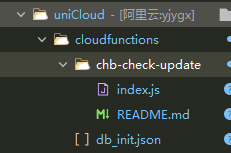
index.js
'use strict';
exports.main = async (event, context) => {
  //event为客户端上传的参数
  console.log('event : ' + event)

  let result = {
    isUpdate: false
  }

  let appid = event.appid
  let clientVersion = event.version

  //这是通过HTTP接口访问的
  if (event.headers) {
    appid = event.queryStringParameters.appid
    clientVersion = event.queryStringParameters.version
  }

  //根据UA判断系统平台
  const os = /iPhone|iPad/.test(context.CLIENTUA) ? 'ios' : 'android'

  if (appid && clientVersion) {
    const db = uniCloud.database();

    const collection = db.collection('uni-app-version')
    const record = await collection.where({
      appid: appid
    }).limit(1).get()

    if (record && record.data && record.data.length > 0) {
      let versionInDb = record.data[0][os]
      if (compare(versionInDb.version, clientVersion) == 1) {
          result.isUpdate = true
        result.update_title = versionInDb.update_title
        result.update_des = versionInDb.update_des
        result.update_type = versionInDb.update_type;
        if(versionInDb.update_type=="0"){
            result.update_url = versionInDb.update_wgturl
        }else(
            result.update_url = versionInDb.update_url
        )
        result.is_update_app = true

      } else {
        result.msg = '当前版本已经是最新的,不需要更新!'
      }
    } else {
      result.msg = 'AppId不匹配'
    }
  }

  console.log('检查结果:', result);

  //返回数据给客户端
  return result
};

/**
 * 对比版本号
 * @param {Object} v1
 * @param {Object} v2
 */
function compare(v1, v2) {
  let arr_1 = v1.split('.')
  let arr_2 = v2.split('.')
  for (var i = 0; i < arr_1.length; i++) {
    if (parseInt(arr_1[i]) > parseInt(arr_2[i])) {
      return 1
    } else if (parseInt(arr_1[i]) < parseInt(arr_2[i])) {
      return -1
    }
  }
  return 0
}
db_init.json
{
    "uni-app-version": {
        "data": [{
          "appid": "__UNI__2991979",
          "name": "智慧GD综合管理平台助手",
          "android": {
            "update_des": "接入uni统计
解决微信自定义组件运行失败的Bug",
            "update_title": "Hello uni-app更新",
            "update_type":"0",
            "update_url": "https://vkceyugu.cdn.bspapp.com/VKCEYUGU-de008e92-ac42-4aea-819d-7512deeb436b/847431fd-f8f3-4ac8-a1e4-56584f73c304.apk",
            "update_wgturl":"https://vkceyugu.cdn.bspapp.com/VKCEYUGU-de008e92-ac42-4aea-819d-7512deeb436b/847431fd-f8f3-4ac8-a1e4-56584f73c304.apk",
            "is_update_app":true,
            "version": "1.1.2"
          }
          // ,
          // "ios": {
          //   "note": "增加权限判断
实例首页重构为 nvue,提升渲染速度",
          //   "title": "Hello uni-app更新",
          //   "url": "https://itunes.apple.com/cn/app/hello-uni-app/id1417078253?mt=8",
          //   "version": "1.3.4"
          // }
        }]
    }
}
App.vue
onLaunch: function() {
            // #ifdef APP-PLUS
            plus.runtime.getProperty(plus.runtime.appid, function(widgetInfo) {
                uniCloud.callFunction({
                  name: 'chb-check-update',
                  data: {
                    version: widgetInfo.version,
                    appid: widgetInfo.appid
                  },
                  success:(e)=>{
                    if (e.result.isUpdate) {//需要更新
                        if(e.result.update_type=="0"){
                            uni.showModal({
                                title: '发现新版本,请点击升级',
                                content: e.result.update_des,
                                cancelText: '稍后更新',
                                confirmText: '立即更新',
                                success: (r) => {
                                    if (r.confirm) {
                                        uni.downloadFile({ //下载更新文件
                                            url: e.result.update_url,
                                            success: (down) => {
                                                    plus.runtime.install(down.tempFilePath, { //安装更新文件
                                                        force: true //是否强制安装
                                                    }, function() { //安装成功
                                                        uni.showToast({
                                                            title: '更新成功',
                                                            icon: 'success',
                                                        })
                                                        plus.runtime.restart() //重启
                                                    }, function() { //更新失败的操作
                                                        uni.showToast({
                                                            title: '更新失败',
                                                        })
                                                    })

                                            }
                                        })
                                    }
                                }
                            })

                        }else{
                            // 提醒用户更新
                            uni.showModal({
                              title: "发现新版本,请点击升级",
                              content: e.result.update_des ? e.result.update_des : '是否选择更新',
                              success: (ee) => {
                                if (ee.confirm) {
                                  plus.runtime.openURL(e.result.update_url);
                                }
                              }
                            })
                        }

                    }
                  }
                })

                });


            // #endif
            console.log('App Launch')

        },