-
电子邮箱
-
邮件服务器
-
邮件协议
-
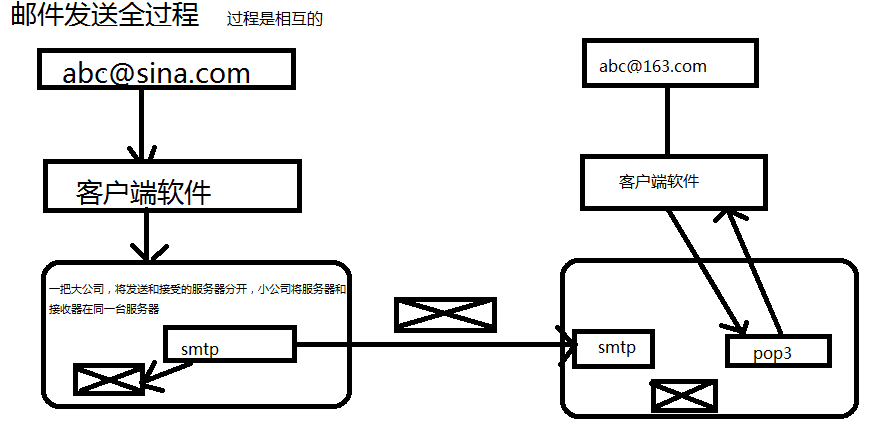
smtp:发送邮件的协议
-
pop:接受邮件的协议
-
-
邮件发送的全过程
5.搭建邮箱服务器:
-
安装邮箱服务器
-
修改域名:
-
工具------->服务器设置----->shop.com
-
-
注册账号:
-
账号------->新建账号
-
6.安装客户端的软件:(接受和发送邮件)
-
常用的有outlook(收费)和foxmail(免费)
-
安装foxmail:
-
进行配置
-
7.编码实现发送邮件
-
引入mail.jar和activation.jar
-
编写代码完成邮件的发送
具体代码如下:
package com.gcy.shop.utils;
import java.util.Properties;
import javax.mail.Authenticator;
import javax.mail.Message;
import javax.mail.Message.RecipientType;
import javax.mail.MessagingException;
import javax.mail.PasswordAuthentication;
import javax.mail.Session;
import javax.mail.Transport;
import javax.mail.internet.AddressException;
import javax.mail.internet.InternetAddress;
import javax.mail.internet.MimeMessage;
/**
* 发送邮件的工具类
* @author Administrator
*
*/
public class MailUtils {
/**
* 发送邮件的方法
* @param to收件人
* @param code激活码
*/
public static void sendMail(String to,String code) {
/**
* 1.获得一个session对象
* 2.创建一个代表邮件的对象message
* 3.发送邮件Transport
*/
//1.获得连接对象
Properties props=new Properties();
props.setProperty("mail.host", "localhost");
//下面方法的第二个参数是一个认证相关的
Session session=Session.getInstance(props, new Authenticator() {
@Override
protected PasswordAuthentication getPasswordAuthentication() {
return new PasswordAuthentication("service@shop.com","123456");
}
});
//2.创建邮件对象
Message message =new MimeMessage(session);
try {
//设置发件人
message.setFrom(new InternetAddress("service@shop.com"));
//设置收件人,其中RecipienType.后面的常量表示(CC)抄送、密送(BCC)
message.addRecipient(RecipientType.TO , new InternetAddress(to));
//设置标题
message.setSubject("来自购物天堂传智商城 官方激活邮件");
//设置邮件的正文
message.setContent("<h1>购物天堂 传智商城官方激活邮件!点下面连接完成激活操作!</h1><h3><a href='http://172.18.225.229:8080/shop/user_active.action?code="+code+"'>http://172.18.225.229:8080/shop/user_active.action?code="+code+"</a></h3>" , "text/html;charset=UTF-8");
//3.发送邮件
Transport.send(message);
} catch (AddressException e) {
e.printStackTrace();
} catch (MessagingException e) {
e.printStackTrace();
}
}
//对上面的代码进行测试
public static void main(String[] args) {
sendMail("aaa@shop.com", "11111111111");
}
}