在淘宝、京东等电商网站,其门户网站都有一个商品品类的多级联动,鼠标移动,就显示,因为前端不是我做的,所以不说明前端实现,只介绍后端实现。
搭建部署SpringBoot环境
配置文件配置:
开启了对Thymeleaf模块引擎的支持
server:
  port: 8081
#logging:
#  config: classpath:logback_spring.xml
#  level:
#    com.muses.taoshop: debug
#  path: /data/logs

spring:
  datasource:

    # 主数据源
    shop:
      url: jdbc:mysql://127.0.0.1:3306/taoshop?autoReconnect=true&useUnicode=true&characterEncoding=utf8&characterSetResults=utf8&useSSL=false
      username: root
      password: root

    driver-class-name: com.mysql.jdbc.Driver
    type: com.alibaba.druid.pool.DruidDataSource

    # 连接池设置
    druid:
      initial-size: 5
      min-idle: 5
      max-active: 20
      # 配置获取连接等待超时的时间
      max-wait: 60000
      # 配置间隔多久才进行一次检测,检测需要关闭的空闲连接,单位是毫秒
      time-between-eviction-runs-millis: 60000
      # 配置一个连接在池中最小生存的时间,单位是毫秒
      min-evictable-idle-time-millis: 300000
      # Oracle请使用select 1 from dual
      validation-query: SELECT 'x'
      test-while-idle: true
      test-on-borrow: false
      test-on-return: false
      # 打开PSCache,并且指定每个连接上PSCache的大小
      pool-prepared-statements: true
      max-pool-prepared-statement-per-connection-size: 20
      # 配置监控统计拦截的filters,去掉后监控界面sql无法统计,'wall'用于防火墙
      filters: stat,wall,slf4j
      # 通过connectProperties属性来打开mergeSql功能;慢SQL记录
      connection-properties: druid.stat.mergeSql=true;druid.stat.slowSqlMillis=5000
      # 合并多个DruidDataSource的监控数据
      use-global-data-source-stat: true

#  jpa:
#    database: mysql
#    hibernate:
#      show_sql: true
#      format_sql: true
#      ddl-auto: none
#      naming:
#        physical-strategy: org.hibernate.boot.entity.naming.PhysicalNamingStrategyStandardImpl

#  mvc:
#    view:
#      prefix: /WEB-INF/jsp/
#      suffix: .jsp

  #添加Thymeleaf配置
  thymeleaf:
    cache: false
    prefix: classpath:/templates/
    suffix: .html
    mode: HTML5
    encoding: UTF-8
    content-type: text/html

  #Jedis配置
#  jedis :
#    pool :
#      host : 127.0.0.1
#      port : 6379
#      password : redispassword
#      timeout : 0
#      config :
#        maxTotal : 100
#        maxIdle : 10
#        maxWaitMillis : 100000
SpringBoot启动类:
package com.muses.taoshop;


import org.mybatis.spring.boot.autoconfigure.MybatisAutoConfiguration;
import org.springframework.boot.*;
import org.springframework.boot.autoconfigure.*;
import org.springframework.boot.autoconfigure.jdbc.DataSourceAutoConfiguration;
import org.springframework.boot.autoconfigure.jdbc.DataSourceTransactionManagerAutoConfiguration;
import org.springframework.boot.web.servlet.ServletComponentScan;
import org.springframework.cache.annotation.EnableCaching;
import org.springframework.scheduling.annotation.EnableAsync;
import org.springframework.scheduling.annotation.EnableScheduling;
import org.springframework.stereotype.*;
import org.springframework.transaction.annotation.EnableTransactionManagement;
import org.springframework.web.bind.annotation.*;
/**
 *
 * <pre>
 *  SpringBoot启动配置类
 * </pre>
 * @author nicky
 * @version 1.00.00
 * <pre>
 * 修改记录
 *    修改后版本:     修改人:  修改日期:     修改内容:
 * </pre>
 */
@Controller
@EnableScheduling//开启对计划任务的支持
@EnableTransactionManagement//开启对事务管理配置的支持
@EnableCaching
@EnableAsync//开启对异步方法的支持
@EnableAutoConfiguration
@ServletComponentScan
@SpringBootApplication(exclude={DataSourceAutoConfiguration.class,
        MybatisAutoConfiguration.class,
        DataSourceTransactionManagerAutoConfiguration.class})
public class PortalApplication {

    @RequestMapping("/")
    @ResponseBody
    String home() {
        return "portal web!";
    }

    @RequestMapping("/doTest")
    @ResponseBody
    String doTest(){
        System.out.println(Thread.currentThread().getName());
        String threadName = Thread.currentThread().getName();
        return threadName;
    }

    public static void main(String[] args) throws Exception {
        SpringApplication.run(PortalApplication.class, args);
    }
}
写个Controller类跳转到门户网站:
ps:品类多级联动思路其实就是先构建一个树,我这里的做法就是先查询处理,然后通过工具类,进行递归遍历,待会给出工具类代码,仅供参考。listCategory方法其实就是获取所有的品类信息
package com.muses.taoshop.web.controller.portal;

import com.alibaba.fastjson.JSON;
import com.muses.taoshop.item.entity.ItemBrand;
import com.muses.taoshop.item.entity.ItemCategory;
import com.muses.taoshop.item.entity.ItemPortal;
import com.muses.taoshop.item.service.IItemBrankService;
import com.muses.taoshop.item.service.IItemCategoryService;
import com.muses.taoshop.item.service.IItemService;
import com.muses.taoshop.util.CategoryTreeUtils;
import com.muses.taoshop.web.controller.BaseController;
import org.springframework.beans.factory.annotation.Autowired;
import org.springframework.stereotype.Controller;
import org.springframework.util.CollectionUtils;
import org.springframework.web.bind.annotation.*;
import org.springframework.web.servlet.ModelAndView;

import java.util.Date;
import java.util.List;

/**
 * <pre>
 *  门户网站控制类
 * </pre>
 *
 * @author nicky
 * @version 1.00.00
 * <pre>
 * 修改记录
 *    修改后版本:     修改人:  修改日期:     修改内容:
 * </pre>
 */
@Controller
@RequestMapping("/portal")
public class IndexController extends BaseController{

    @Autowired
    IItemService iItemService;
    @Autowired
    IItemBrankService iItemBrankService;
    @Autowired
    IItemCategoryService iItemCategoryService;

    /**
     * 跳转到门户网站
     * @return
     */
    @GetMapping(value = "/toIndex.do")
    public ModelAndView toIndex(){
        info("跳转到门户网站");
        ModelAndView mv = this.getModelAndView();
        mv.setViewName("index");
        List<ItemPortal> items = iItemService.listItemPortal();
        CategoryTreeUtils treeUtil = new CategoryTreeUtils();
        List<ItemCategory> list = iItemCategoryService.listCategory();
        List<ItemCategory> categories = treeUtil.buildCategoryTree(list);
        mv.addObject("items" , items);
        mv.addObject("categories" , categories);
        return mv;
    }

    @GetMapping(value = "/doTest")
    @ResponseBody
    public  String doTest(){
        List<ItemBrand> itemBrands = iItemBrankService.listItemBrand();
        String str = JSON.toJSON(itemBrands).toString();
        return str;
    }


}
业务接口类:
 package com.muses.taoshop.item.service;

import com.muses.taoshop.item.entity.ItemCategory;
import com.muses.taoshop.item.entity.ItemList;

import java.util.List;

/**
 * <pre>
 *  商品品类信息接口
 * </pre>
 *
 * @author nicky
 * @version 1.00.00
 * <pre>
 * 修改记录
 *    修改后版本:     修改人:  修改日期: 2018.06.17 10:59    修改内容:
 * </pre>
 */
public interface IItemCategoryService {

    /**
     * 查询所有商品品类信息
     * @return
     */
    List<ItemCategory> listCategory();
业务服务实现类:
  package com.muses.taoshop.item.service;

import com.muses.taoshop.item.entity.ItemCategory;
import com.muses.taoshop.item.entity.ItemList;
import com.muses.taoshop.item.mapper.ItemCategoryMapper;
import org.springframework.beans.factory.annotation.Autowired;
import org.springframework.stereotype.Service;

import java.util.List;

/**
 * <pre>
 *  商品品类信息服务实现类
 * </pre>
 *
 * @author nicky
 * @version 1.00.00
 * <pre>
 * 修改记录
 *    修改后版本:     修改人:  修改日期: 2018.06.17 11:01    修改内容:
 * </pre>
 */
@Service
public class ItemCategoryServiceImpl implements IItemCategoryService{

    @Autowired
    ItemCategoryMapper itemCategoryMapper;


    /**
     * 查询所有的商品品类信息
     * @return
     */
    @Override
    public List<ItemCategory> listCategory() {
        return itemCategoryMapper.listCategory();
    }


}
Mybatis相关代码:
<?xml version="1.0" encoding="UTF-8" ?>
<!DOCTYPE mapper PUBLIC "-//mybatis.org//DTD Mapper 3.0//EN" "http://mybatis.org/dtd/mybatis-3-mapper.dtd" >
<mapper namespace="com.muses.taoshop.item.mapper.ItemCategoryMapper" >
  <resultMap id="BaseResultMap" type="com.muses.taoshop.item.entity.ItemCategory" >
    <id column="id" property="id" jdbcType="BIGINT" />
    <result column="category_name" property="categoryName" jdbcType="VARCHAR" />
    <result column="sjid" property="sjid" jdbcType="BIGINT" />
    <result column="last_modify_time" property="lastModifyTime" jdbcType="TIMESTAMP" />
    <result column="create_time" property="createTime" jdbcType="TIMESTAMP" />
  </resultMap>

  <sql id="BaseColumnList" >
    id,
        category_name as categoryName,
        sjid,
        last_modify_time as lastModifyTime,
        create_time as createTime
  </sql>

    <!-- 获取所有的商品品类信息-->
    <select id="listCategory" resultType="ItemCategory">
        SELECT
        <include refid="BaseColumnList" />
        FROM item_category t
    </select>

</mapper>
Mapper接口类:
package com.muses.taoshop.item.mapper;

import com.muses.taoshop.item.entity.ItemCategory;
import com.muses.taoshop.item.entity.ItemList;
import org.apache.ibatis.annotations.Mapper;
import org.apache.ibatis.annotations.Param;

import java.util.List;
@Mapper
public interface ItemCategoryMapper {

    List<ItemCategory> listCategory();


}
实体类:
这里用了lombok的jar来实现,所有不用set和get方法
package com.muses.taoshop.item.entity;


import com.alibaba.fastjson.annotation.JSONField;
import com.fasterxml.jackson.annotation.JsonFormat;
import com.fasterxml.jackson.databind.annotation.JsonSerialize;
import lombok.Data;
import org.springframework.format.annotation.DateTimeFormat;

import javax.validation.constraints.NotNull;
import java.util.Date;
import java.util.List;

/**
 * <pre>
 *  商品品类
 * </pre>
 * @author nicky
 * @version 1.00.00
 * <pre>
 * 修改记录
 *    修改后版本:     修改人:  修改日期: 2018.06.09 21:49    修改内容:
 * </pre>
 */
@Data
public class ItemCategory {
    /**
     * 商品品类id
     */
    private Long id;

    /**
     * 商品品类名称
     */
    private String categoryName;

    /**
     * 上级id
     */
    private Long sjid;

    /**
     * 上次修改时间
     */
    @JSONField(format ="yyyy-MM-dd HH:mm:ss")
    private Date lastModifyTime;

    /**
     * 创建时间
     */
    @JSONField(format ="yyyy-MM-dd HH:mm:ss")
    private Date createTime;

    /**
     * 子菜单
     */
    private List<ItemCategory> subCategorys;


}
构建品类树的工具类:
package com.muses.taoshop.util;

import com.muses.taoshop.item.entity.ItemCategory;

import javax.mail.FetchProfile;
import java.util.ArrayList;
import java.util.List;

/**
 * <pre>
 *  构造一棵品类树
 * </pre>
 *
 * @author nicky
 * @version 1.00.00
 * <pre>
 * 修改记录
 *    修改后版本:     修改人:  修改日期: 2018.06.24 17:12    修改内容:
 * </pre>
 */
public class CategoryTreeUtils {


    public List<ItemCategory> commonCategorys;

    public List<ItemCategory> list = new ArrayList<ItemCategory>();

    public List<ItemCategory> buildCategoryTree(List<ItemCategory> categories ) {
        this.commonCategorys = categories;
        for (ItemCategory c : categories){
            ItemCategory category = new ItemCategory();
            if(c.getSjid() == 0){
                category.setSjid(c.getSjid());
                category.setId(c.getId());
                category.setCategoryName(c.getCategoryName());
                category.setSubCategorys(treeChild(c.getId()));
                list.add(category);
            }
        }
        return list;
    }

    public List<ItemCategory> treeChild(long id){
        List<ItemCategory> list = new ArrayList<ItemCategory>();
        for(ItemCategory c : commonCategorys){
            ItemCategory category = new ItemCategory();
            if(c.getSjid() == id){
                category.setSjid(c.getSjid());
                category.setId(c.getId());
                category.setCategoryName(c.getCategoryName());
                category.setSubCategorys(treeChild(c.getId()));//递归循环
                list.add(category);
            }
        }
        return list;
    }
}
前端代码:
<div class="headerNav" xmlns:th="http://www.thymeleaf.org">
    <div class="layout">
        <dl class="all-brands">
            <dt class="all-brands-head"> <a href="#">全部商品分类</a> </dt>
            <dd class="all-brands-list">
                <div class="wrap" th:each="c : ${categories}">
                    <div class="all-sort-list">
                        <div class="item bo">
                            <h3>
                                <a href="" th:text="${c.categoryName}"></a></h3>
                            <div class="item-list clearfix">
                                <div class="close">x</div>
                                <div class="subitem" th:each="s: ${c.subCategorys}">
                                    <dl class="fore1">
                                        <dt th:text="${s.categoryName}"><a th:href="@{'/portal/category/toCategoryList/'+${s.id}}"></a></dt>
                                        <dd>
                                            <em th:each="ss : ${s.subCategorys} "><a th:href="@{'/portal/category/toCategoryList/'+${ss.id}}" th:text="${ss.categoryName}"></a></em>
                                        </dd>
                                    </dl>
                                </div>
                            </div>
                        </div>
                    </div>
                </div>
            </dd>

        </dl>

        </div>
    </div>
</div>
实现的效果如图:可以说是3级联动
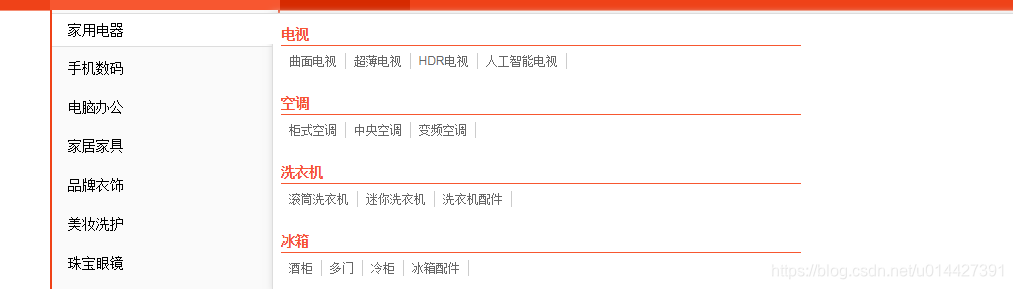
这是在开发中的开源项目的一个小功能,源码已经开源,github链接