相关详细内容参考如下链接:http://v3.bootcss.com/javascript/
一、模态框
位置要放在body里面,作为body的直接子元素:
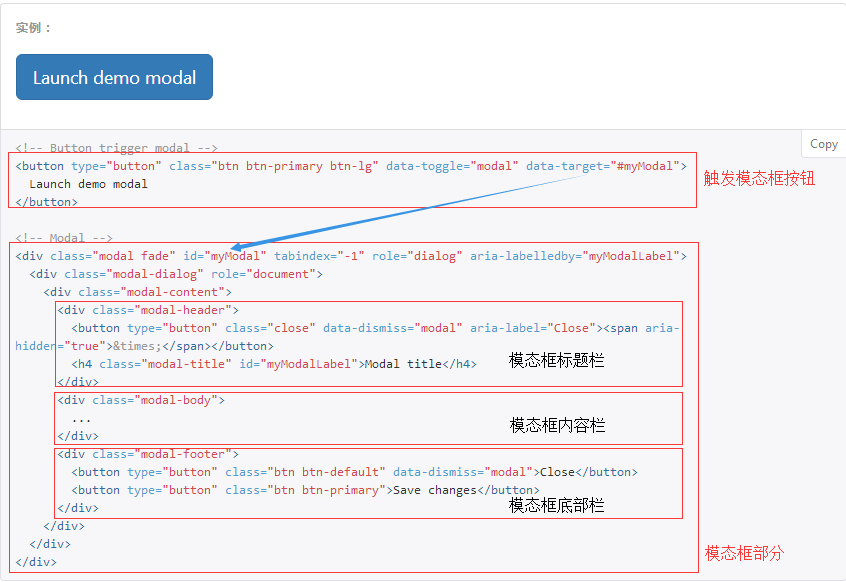
1、弹出方式:
(1).通过 data 属性:data-toggle="modal" data-target="#myModal"
(2).通过JS代码:- $("#myModal").modal("show") --> 显示出来;- $("#myModal").modal("hide) --> 隐藏
2、模态框大小:
模态框提供了两个可选尺寸,通过为 .modal-dialog 增加一个样式调整类实现。.modal-lg为设置为大模态框,.modal-sm为设置为小模态框
3、设置动画效果:
如果你不需要模态框弹出时的动画效果(淡入淡出效果),删掉 .fade 类即可。
参数
backdrop: true/false/'static' --> 遮罩层的参数
keyboard: true/false --> 键盘上的ESC按键
二、轮播图

通过如下js形式设置图片自动切换的时间间隔:
<script>
    $('.carousel').carousel({
        interval: 2000                                                                //时间单位为毫秒
    })
</script>
三、左侧菜单
<div class="panel-group" id="accordion" role="tablist" aria-multiselectable="true">
  <div class="panel panel-default">
    <div class="panel-heading" role="tab" id="headingOne">
      <h4 class="panel-title">
        <a role="button" data-toggle="collapse" data-parent="#accordion" href="#collapseOne" aria-expanded="true" aria-controls="collapseOne">
         菜单一
        </a>
      </h4>
    </div>
    <div id="collapseOne" class="panel-collapse collapse in" role="tabpanel" aria-labelledby="headingOne">
      <div class="panel-body">
       内容1
      </div>
    </div>
  </div>
  <div class="panel panel-default">
    <div class="panel-heading" role="tab" id="headingTwo">
      <h4 class="panel-title">
        <a class="collapsed" role="button" data-toggle="collapse" data-parent="#accordion" href="#collapseTwo" aria-expanded="false" aria-controls="collapseTwo">
         菜单二
        </a>
      </h4>
    </div>
    <div id="collapseTwo" class="panel-collapse collapse" role="tabpanel" aria-labelledby="headingTwo">
      <div class="panel-body">
       内容2
      </div>
    </div>
  </div>
  <div class="panel panel-default">
    <div class="panel-heading" role="tab" id="headingThree">
      <h4 class="panel-title">
        <a class="collapsed" role="button" data-toggle="collapse" data-parent="#accordion" href="#collapseThree" aria-expanded="false" aria-controls="collapseThree">
         菜单三
        </a>
      </h4>
    </div>
    <div id="collapseThree" class="panel-collapse collapse" role="tabpanel" aria-labelledby="headingThree">
      <div class="panel-body">
       内容3
      </div>
    </div>
  </div>
</div>
四、其他插件
1、FontAwesome字体
参考网址:http://fontawesome.io/;详细用法参见上述站点的Examples。需要强调的是使用此字体时需要引入相应的css样式,如下例:
<link rel="stylesheet" href="fontAwesome/css/font-awesome.css">
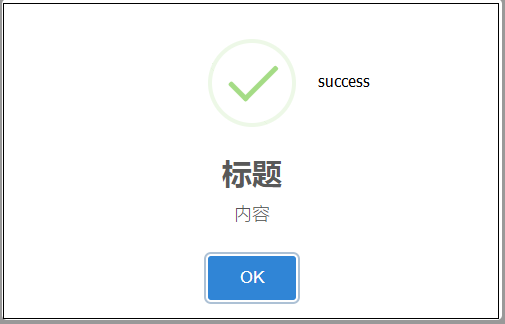
2、SweetAlert系列
参考网址:https://github.com/limonte/sweetalert2;主要用于alert出不同的样式,需要强调的是使用此字体需要引入相应的css和js文件,如下例:
<script src="bower_components/sweetalert2/dist/sweetalert2.min.js"></script>
<link rel="stylesheet" href="bower_components/sweetalert2/dist/sweetalert2.min.css">
应用的实例如下:
<!DOCTYPE html>
<html lang="zh-CN">
<head>
    <meta charset="UTF-8">
    <meta http-equiv="X-UA-Compatible" content="IE=edge">
    <meta name="viewport" content="width=device-width, initial-scale=1, maximum-scale=1, user-scalable=no">
    <title>sweetalert示例</title>
    <link rel="stylesheet" href="bootstrap/css/bootstrap.min.css">
    <link rel="stylesheet" href="sweetalert/sweetalert2.min.css">
</head>
<body>

<button class="btn btn-success">点我</button>

<script src="jquery-3.2.1.min.js"></script>
<script src="bootstrap/js/bootstrap.min.js"></script>
<script src="sweetalert/sweetalert2.all.min.js"></script>
<script>
    $("button").on("click", function () {
        swal("标题", "内容", "success");                         //常用的有如下几种类型:success   error warning  info    question
    })
</script>
</body>
</html>

3、jQueryLazyLoad
称为懒加载,常见应用就是浏览器的省流量设置,使用原理为:加载时显示小图标,通过小图标点击触发真正的图标显示,应用实例如下:
<!DOCTYPE html>
<html lang="zh-CN">
<head>
  <meta charset="UTF-8">
  <meta http-equiv="x-ua-compatible" content="IE=edge">
  <meta name="viewport" content="width=device-width, initial-scale=1">
  <title>懒加载示例</title>
</head>
<body>
<div>
  <div><img src="img/0.jpg" alt="" class="lazy" data-original="img/5.jpg" width="600px" height="400px"></div>
  ...
  <div><img src="img/0.jpg" alt="" class="lazy" data-original="img/6.jpg" width="600px" height="400px"></div>
</div>
<script src="https://cdn.bootcss.com/jquery/3.2.1/jquery.min.js"></script>
<script src="jquery.lazyload.min.js"></script>                                         //需要引入此插件
<script>
  $("img.lazy").lazyload({
    effect: "fadeIn",
    event: "click"
  })
</script>
</body>
</html>