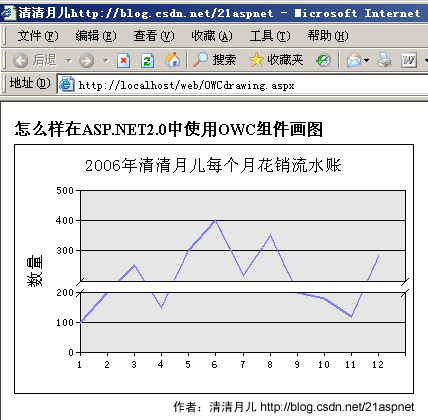
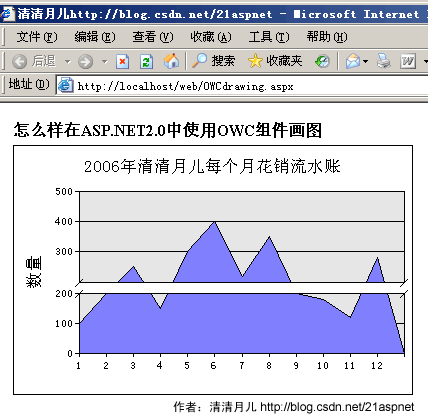
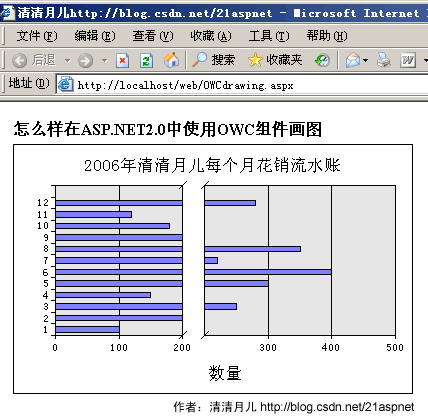
本文讲述如何绘制条形图,折线图,柱形图,面积图等常见图形。
效果图: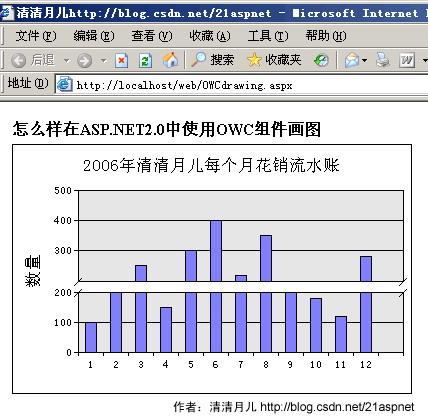
手把手教程:
原理:OWC是Office Web Compent的缩写,即Microsoft的Office Web组件,它为在Web中绘制图形提供了灵活的同时也是最基本的机制。在一个intranet环境中,如果可以假设客户机上存在特定的浏览器和一些功能强大的软件(如IE6和Office 2000/XP/2003),那么就有能力利用Office Web组件提供一个交互式图形开发环境。这种模式下,客户端工作站将在整个任务中分担很大的比重。理论上说Excel能做的图都可以通过OWC画。
第一步:
右键点击网站根目录引用。如图所示:
第二步:
点击“添加引用”后弹出一个窗口,添加OWC的引用。如图所示:
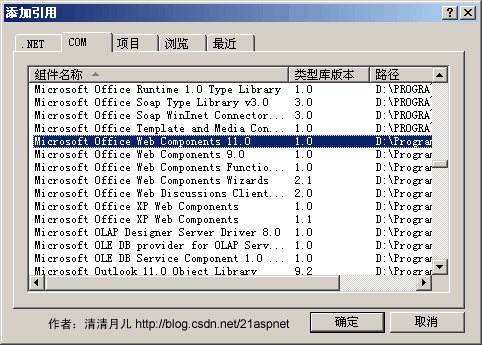
点“确定”。
第三步:
代码中引用Microsoft.Office.Interop.Owc11。
全部代码
后台代码:
using System;
using System.Data;
using System.Configuration;
using System.Web;
using System.Web.Security;
using System.Web.UI;
using System.Web.UI.WebControls;
using System.Web.UI.WebControls.WebParts;
using System.Web.UI.HtmlControls;
using System.Data.SqlClient;  //添加数据操作引用
using Microsoft.Office.Interop.Owc11;//添加Office组件引用
public partial class OWCdrawing : System.Web.UI.Page
{
    protected void Page_Load(object sender, EventArgs e)
    {
        //连接数据库并获取特定字符串
        string strSeriesName = "图例1";
        string C;
        string ConnectString = "Server=(local);DataBase=web;Uid=sa;Pwd=sa";
        string Sql = "SELECT month,Allcount FROM Chart";
        SqlConnection myConn = new SqlConnection(ConnectString);
        myConn.Open();
 SqlDataAdapter Da = new SqlDataAdapter(Sql, myConn);
        DataSet ds = new DataSet();
        Da.Fill(ds);
        //存放月
        string[] MonNum = new string[12];
        //存放数据
        string[] MonCount = new string[12];
        //为数组赋值
        for (int i = 0; i < ds.Tables[0].Rows.Count; i++)
        {
            MonNum[i] = ds.Tables[0].Rows[i][0].ToString();
            MonCount[i] = ds.Tables[0].Rows[i][1].ToString();
        }
        //为x轴指定特定字符串,以便显示数据
        string strXdata = String.Empty;
        foreach (string strData in MonNum)
        {
            strXdata += strData + "\t";
        }
        string strYdata = String.Empty;
        //为y轴指定特定的字符串,以便与x轴相对应
        foreach (string strValue in MonCount)
        {
            strYdata += strValue + "\t";
        }
        //创建ChartSpace对象来放置图表
        ChartSpace laySpace = new ChartSpaceClass();
        //在ChartSpace对象中添加图表
        ChChart InsertChart = laySpace.Charts.Add(0);
        //指定绘制图表的类型。类型可以通过OWC.ChartChartTypeEnum枚举值得到
        InsertChart.Type = ChartChartTypeEnum.chChartTypeLine;//折线图
        //InsertChart.Type = ChartChartTypeEnum.chChartTypeArea;//面积图
        //InsertChart.Type = ChartChartTypeEnum.chChartTypeBarClustered;//条形图
        //InsertChart.Type = ChartChartTypeEnum.chChartTypeColumnClustered;//柱形图

        //指定图表是否需要图例标注
        InsertChart.HasLegend = false;

        InsertChart.HasTitle = true;//为图表添加标题
        InsertChart.Title.Caption = "2006年清清月儿每个月花销流水账";//标题名称
        //为x,y轴添加图示说明
        InsertChart.Axes[0].HasTitle = true;
        InsertChart.Axes[0].Title.Caption = "";//月份
        InsertChart.Axes[1].HasTitle = true;
        InsertChart.Axes[1].Scaling.SplitMinimum = 200;
        InsertChart.Axes[1].Title.Caption = "数量";
        //添加一个series系列
        InsertChart.SeriesCollection.Add(0);
        //给定series系列的名字
        InsertChart.SeriesCollection[0].SetData(ChartDimensionsEnum.chDimSeriesNames, +(int)ChartSpecialDataSourcesEnum.chDataLiteral, strSeriesName);
        //给定分类
        InsertChart.SeriesCollection[0].SetData(ChartDimensionsEnum.chDimCategories, +(int)ChartSpecialDataSourcesEnum.chDataLiteral, strXdata);
        //给定值
        InsertChart.SeriesCollection[0].SetData(ChartDimensionsEnum.chDimValues, (int)ChartSpecialDataSourcesEnum.chDataLiteral, strYdata);
        //输出文件.
        string strAbsolutePath = (Server.MapPath(".")) + "\\ShowData.gif";
        laySpace.ExportPicture(strAbsolutePath, "GIF", 400, 250);
        //创建GIF文件的相对路径.
        string strRelativePath = "./ShowData.gif";
        //把图片添加到placeholder中,并在页面上显示
        string strImageTag = "<IMG SRC='" + strRelativePath + "'/>";
        this.PlaceHolder1.Controls.Add(new LiteralControl(strImageTag));
    }
}
前台代码:
<%@ Page Language="C#" AutoEventWireup="true" CodeFile="OWCdrawing.aspx.cs" Inherits="OWCdrawing" %>
<!DOCTYPE html PUBLIC "-//W3C//DTD XHTML 1.0 Transitional//EN" "http://www.w3.org/TR/xhtml1/DTD/xhtml1-transitional.dtd">
<html xmlns="http://www.w3.org/1999/xhtml" >
<head runat="server">
    <title>清清月儿http://blog.csdn.net/21aspnet</title>
</head>
<body>
    <form id="form1" runat="server">
  <div style="text-align: left">
        <table style=" 600px">
            <tr>
                <td colspan="3" style="height: 20px">
                    <strong>怎么样在ASP.NET2.0中使用OWC组件画图</strong></td>
            </tr>
            <tr>
                <td colspan="3" rowspan="2" style="height: 21px">
        <asp:PlaceHolder ID="PlaceHolder1" runat="server"></asp:PlaceHolder>
                </td>
            </tr>
            <tr>
            </tr>
        </table>
    </div>
    </form>
</body>
</html>
数据库SQL脚本:
USE [web]
GO
/****** 对象: Table [dbo].[Chart] 脚本日期: 03/27/2007 22: 26:00 ******/
SET ANSI_NULLS ON
GO
SET QUOTED_IDENTIFIER ON
GO
CREATE TABLE [dbo].[Chart](
[id] [int] IDENTITY(1,1) NOT NULL,
[month] [smallint] NULL,
[Allcount] [int] NULL
) ON [PRIMARY]
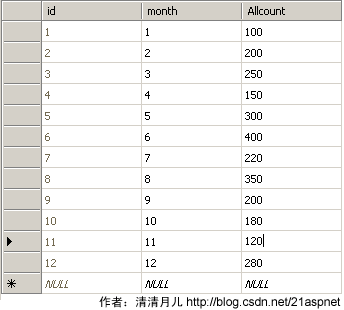
在数据库建好表以后要自己手动假想有12条数据,手动添加,最终结果类似下图:
 后台程序说明:
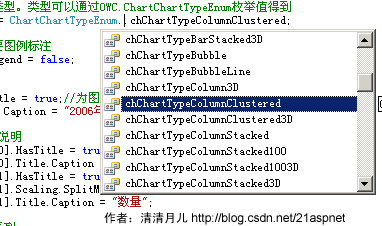
最关键就是InsertChart.Type = ChartChartTypeEnum.chChartTypeColumnClustered;
你可以在ChartChartTypeEnum后点出其他方法。如图所示:
 下面列出的是其他类型图:
折线图:
面积图:
条形图:
OWC什么图形都可以画,还能画立体的,请大家自己尝试。