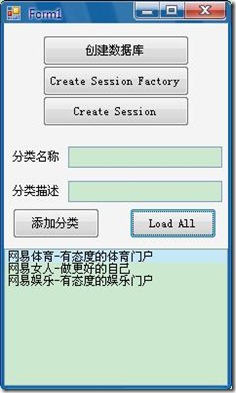
前言
这一章是一个完整的NHibernate的Simple,原文中用Fluent NHibernate做映射,但我使用NHibernate3.2版本,所以3.2的Conformist代替Fluent NHibernate.
从这里我们将学习到使用NHibernate的一般步骤:
1.定义Model
2.映射Model
3.定义配置
4.1根据配置创建数据库
4.2根据配置BuildSessionFactory
5.用SessionFactory对象OpenSession
6.用session对象做数据库操作
1.定义Model
定义两个类Product,Category
public class Category
{
    public virtual int Id { get; set; }
    public virtual string Name { get; set; }
    public virtual string Description { get; set; }
}
public class Product
{
    public virtual int Id { get; set; }
    public virtual string Name { get; set; }
    public virtual string Description { get; set; }
    public virtual decimal UnitPrice { get; set; }
    public virtual int ReorderLevel { get; set; }
    public virtual bool Discontinued { get; set; }
    public virtual Category Category { get; set; }
}
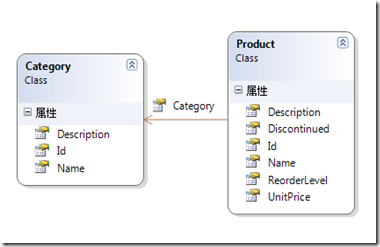
类关系图:
2.映射Model
创建两个类CategoryMap,ProductMap
public class ProductMap : ClassMapping<Product>
{
    public ProductMap()
    {
        this.Id(p => p.Id, map =>
        {
            map.Generator(Generators.Identity);
        });
        this.Property(p => p.Description);
        this.Property(p => p.Discontinued);
        this.Property(p => p.Name);
        this.Property(p => p.ReorderLevel);
        this.Property(p => p.UnitPrice);
        this.ManyToOne(p => p.Category);
    }
}
上面主键自动递增,Product的Category属性用ManyToOne映射
3.定义配置
public Form1()
{
    InitializeComponent();

    configuration.DataBaseIntegration(
        x =>
        {
            x.Dialect<SQLiteDialect>();
            x.Driver<SQLite20Driver>();
            x.ConnectionString = connString;
        });

    var mapper = new ModelMapper();
    mapper.AddMapping<ProductMap>();
    mapper.AddMapping<CategoryMap>();
    var hbmMapping = mapper.CompileMappingForAllExplicitlyAddedEntities();
    configuration.AddMapping(hbmMapping);
    Debug.WriteLine(hbmMapping.AsString());
}
 View Code

<?xml version="1.0" encoding="utf-8"?>
<hibernate-mapping xmlns:xsi="http://www.w3.org/2001/XMLSchema-instance" xmlns:xsd="http://www.w3.org/2001/XMLSchema" namespace="Chapter2" assembly="Chapter2" xmlns="urn:nhibernate-mapping-2.2">
  <class name="Product">
    <id name="Id" type="Int32">
      <generator class="identity"/>
    </id>
    <property name="Name"/>
    <property name="Description"/>
    <property name="UnitPrice"/>
    <property name="ReorderLevel"/>
    <property name="Discontinued"/>
    <many-to-one name="Category"/>
  </class>
  <class name="Category">
    <id name="Id" type="Int32">
      <generator class="identity"/>
    </id>
    <property name="Name"/>
    <property name="Description"/>
  </class>
</hibernate-mapping>
4.1根据配置创建数据库
有了配置就可以生成数据库
private void btCreateDataBase_Click(object sender, EventArgs e)
{
    var sc = new SchemaExport(configuration);
    sc.SetOutputFile(@"db.sql").Execute(false, false, false);
    sc.Create(false, true);
}

生成的数据库关系图
4.2根据配置BuildSessionFactory
有了配置就可以BuildSessionFactory
private ISessionFactory CreateSessionFactory()
{
    return configuration.BuildSessionFactory();
}
5.用SessionFactory对象打开Session
有了ISessionFactory 就可以OpenSession
private void btnCreateSession_Click(object sender, EventArgs e)
{
    var factory = CreateSessionFactory();
    using (var session = factory.OpenSession())
    {
        // do something with the session
    }
}
6.用session对象做数据库操作
有了ISession对象,就像做数据库操作,可以把ISession对象想象成对象化的数据库
添加
private void btAddCategory_Click(object sender, EventArgs e)
{
    var factory = CreateSessionFactory();
    using (var session = factory.OpenSession())
    {
        var category = new Category
        {
            Name = txtCategoryName.Text,
            Description = txtCategoryDescription.Text
        };
        var id = session.Save(category);
        MessageBox.Show(id.ToString());
    }
}
查询
private void btLoadAll_Click(object sender, EventArgs e)
{
    var factory = CreateSessionFactory();
    using (var session = factory.OpenSession())
    {
        var categories = session.Query<Category>()
        .OrderBy(c => c.Id)
        .Select(c => c.Name + "-" + c.Description).ToArray();
        lbCategory.DataSource = categories;
    }
}