1. 准备 Nginx 程序
可参考:使用Nginx搭建http服务器
nginx.conf配置文件,注意Nginx默认是后台运行的,但Docker需要其在前台运行,否则直接退出容器。配置文件中添加daemon off;关闭后台运行。
-bash-4.2# cat nginx.conf

#user  nobody;
worker_processes  2;

#error_log  logs/error.log;
#error_log  logs/error.log  notice;
#error_log  logs/error.log  info;

#pid        logs/nginx.pid;

daemon off;

events {
    worker_connections  50000;
}


http {
    include       mime.types;
    default_type  application/octet-stream;

    #log_format  main  '$remote_addr - $remote_user [$time_local] "$request" '
    #                  '$status $body_bytes_sent "$http_referer" '
    #                  '"$http_user_agent" "$http_x_forwarded_for"';

    #access_log  logs/access.log  main;

    sendfile        on;
    #tcp_nopush     on;

    #keepalive_timeout  0;
    keepalive_timeout  65;

    #gzip  on;

    server {
        listen       80;
        server_name  localhost;

        #charset koi8-r;

        #access_log  logs/host.access.log  main;

        location / {
            root   html;
            index  index.html index.htm;
        }

        #error_page  404              /404.html;

        # redirect server error pages to the static page /50x.html
        #
        error_page   500 502 503 504  /50x.html;
        location = /50x.html {
            root   html;
        }

        # proxy the PHP scripts to Apache listening on 127.0.0.1:80
        #
        #location ~ .php$ {
        #    proxy_pass   http://127.0.0.1;
        #}

        # pass the PHP scripts to FastCGI server listening on 127.0.0.1:9000
        #
        #location ~ .php$ {
        #    root           html;
        #    fastcgi_pass   127.0.0.1:9000;
        #    fastcgi_index  index.php;
        #    fastcgi_param  SCRIPT_FILENAME  /scripts$fastcgi_script_name;
        #    include        fastcgi_params;
        #}

        # deny access to .htaccess files, if Apache's document root
        # concurs with nginx's one
        #
        #location ~ /.ht {
        #    deny  all;
        #}
    }


    # another virtual host using mix of IP-, name-, and port-based configuration
    #
    #server {
    #    listen       8000;
    #    listen       somename:8080;
    #    server_name  somename  alias  another.alias;

    #    location / {
    #        root   html;
    #        index  index.html index.htm;
    #    }
    #}


    # HTTPS server
    #
    server {
        listen       443 ssl;
        server_name  localhost;

        ssl_certificate      ssl/server.crt;
        ssl_certificate_key  ssl/server.key;

        ssl_session_cache    shared:SSL:1m;
        ssl_session_timeout  5m;

        ssl_ciphers  HIGH:!aNULL:!MD5;
        ssl_prefer_server_ciphers  on;

        location / {
            root   html;
            index  index.html index.htm;
        }
    }

}
启动脚本 start.sh
#!/bin/bash

./sbin/nginx -p ./
对于Nginx程序需要打包成.tar文件,然后复制到Docker中之后再解压。
2. 创建Docker镜像
Dockerfile
FROM centos
RUN mkdir -p /usr/local/
COPY nginx.tar /usr/local/
RUN cd /usr/local/ && tar -xvf nginx.tar && rm -rf nginx.tar
EXPOSE 80
WORKDIR /usr/local/nginx
CMD ["sh", "-c", "./start_nginx.sh"]
build
-bash-4.2# docker build -t mynginx:v1.0.0 -f Dockerfile .
Sending build context to Docker daemon 39.64 MB
Step 1/7 : FROM centos
 ---> 5182e96772bf
Step 2/7 : RUN mkdir -p /usr/local/
 ---> Using cache
 ---> 8fc14caafbae
Step 3/7 : COPY nginx.tar /usr/local/
 ---> e768f8697757
Removing intermediate container 3505feeb28f9
Step 4/7 : RUN cd /usr/local/ && tar -xvf nginx.tar && rm -rf nginx.tar
 ---> Running in 539c25632fb6
nginx/
nginx/conf/
nginx/conf/fastcgi.conf
nginx/conf/fastcgi_params
nginx/conf/koi-utf
nginx/conf/koi-win
nginx/conf/mime.types
nginx/conf/scgi_params
nginx/conf/uwsgi_params
nginx/conf/win-utf
nginx/conf/ssl/
nginx/conf/ssl/server.crt
nginx/conf/ssl/server.csr
nginx/conf/ssl/server.key
nginx/conf/ssl/server.key.org
nginx/conf/nginx.conf
nginx/sbin/
nginx/sbin/ngx_auto_headers.h
nginx/sbin/autoconf.err
nginx/sbin/ngx_auto_config.h
nginx/sbin/ngx_modules.c
nginx/sbin/src/
nginx/sbin/src/core/
nginx/sbin/src/core/nginx.o
nginx/sbin/src/core/ngx_log.o
nginx/sbin/src/core/ngx_palloc.o
nginx/sbin/src/core/ngx_array.o
nginx/sbin/src/core/ngx_list.o
nginx/sbin/src/core/ngx_hash.o
nginx/sbin/src/core/ngx_buf.o
nginx/sbin/src/core/ngx_queue.o
nginx/sbin/src/core/ngx_output_chain.o
nginx/sbin/src/core/ngx_string.o
nginx/sbin/src/core/ngx_parse.o
nginx/sbin/src/core/ngx_parse_time.o
nginx/sbin/src/core/ngx_inet.o
nginx/sbin/src/core/ngx_file.o
nginx/sbin/src/core/ngx_crc32.o
nginx/sbin/src/core/ngx_murmurhash.o
nginx/sbin/src/core/ngx_md5.o
nginx/sbin/src/core/ngx_sha1.o
nginx/sbin/src/core/ngx_rbtree.o
nginx/sbin/src/core/ngx_radix_tree.o
nginx/sbin/src/core/ngx_slab.o
nginx/sbin/src/core/ngx_times.o
nginx/sbin/src/core/ngx_shmtx.o
nginx/sbin/src/core/ngx_connection.o
nginx/sbin/src/core/ngx_cycle.o
nginx/sbin/src/core/ngx_spinlock.o
nginx/sbin/src/core/ngx_rwlock.o
nginx/sbin/src/core/ngx_cpuinfo.o
nginx/sbin/src/core/ngx_conf_file.o
nginx/sbin/src/core/ngx_module.o
nginx/sbin/src/core/ngx_resolver.o
nginx/sbin/src/core/ngx_open_file_cache.o
nginx/sbin/src/core/ngx_crypt.o
nginx/sbin/src/core/ngx_proxy_protocol.o
nginx/sbin/src/core/ngx_syslog.o
nginx/sbin/src/core/ngx_regex.o
nginx/sbin/src/event/
nginx/sbin/src/event/modules/
nginx/sbin/src/event/modules/ngx_epoll_module.o
nginx/sbin/src/event/ngx_event.o
nginx/sbin/src/event/ngx_event_timer.o
nginx/sbin/src/event/ngx_event_posted.o
nginx/sbin/src/event/ngx_event_accept.o
nginx/sbin/src/event/ngx_event_connect.o
nginx/sbin/src/event/ngx_event_pipe.o
nginx/sbin/src/event/ngx_event_openssl.o
nginx/sbin/src/event/ngx_event_openssl_stapling.o
nginx/sbin/src/os/
nginx/sbin/src/os/unix/
nginx/sbin/src/os/unix/ngx_time.o
nginx/sbin/src/os/unix/ngx_errno.o
nginx/sbin/src/os/unix/ngx_alloc.o
nginx/sbin/src/os/unix/ngx_files.o
nginx/sbin/src/os/unix/ngx_socket.o
nginx/sbin/src/os/unix/ngx_recv.o
nginx/sbin/src/os/unix/ngx_readv_chain.o
nginx/sbin/src/os/unix/ngx_udp_recv.o
nginx/sbin/src/os/unix/ngx_send.o
nginx/sbin/src/os/unix/ngx_writev_chain.o
nginx/sbin/src/os/unix/ngx_udp_send.o
nginx/sbin/src/os/unix/ngx_udp_sendmsg_chain.o
nginx/sbin/src/os/unix/ngx_channel.o
nginx/sbin/src/os/unix/ngx_shmem.o
nginx/sbin/src/os/unix/ngx_process.o
nginx/sbin/src/os/unix/ngx_daemon.o
nginx/sbin/src/os/unix/ngx_setaffinity.o
nginx/sbin/src/os/unix/ngx_setproctitle.o
nginx/sbin/src/os/unix/ngx_posix_init.o
nginx/sbin/src/os/unix/ngx_user.o
nginx/sbin/src/os/unix/ngx_dlopen.o
nginx/sbin/src/os/unix/ngx_process_cycle.o
nginx/sbin/src/os/unix/ngx_linux_init.o
nginx/sbin/src/os/unix/ngx_linux_sendfile_chain.o
nginx/sbin/src/os/win32/
nginx/sbin/src/http/
nginx/sbin/src/http/v2/
nginx/sbin/src/http/modules/
nginx/sbin/src/http/modules/perl/
nginx/sbin/src/http/modules/ngx_http_log_module.o
nginx/sbin/src/http/modules/ngx_http_chunked_filter_module.o
nginx/sbin/src/http/modules/ngx_http_range_filter_module.o
nginx/sbin/src/http/modules/ngx_http_gzip_filter_module.o
nginx/sbin/src/http/modules/ngx_http_ssi_filter_module.o
nginx/sbin/src/http/modules/ngx_http_charset_filter_module.o
nginx/sbin/src/http/modules/ngx_http_userid_filter_module.o
nginx/sbin/src/http/modules/ngx_http_headers_filter_module.o
nginx/sbin/src/http/modules/ngx_http_not_modified_filter_module.o
nginx/sbin/src/http/modules/ngx_http_static_module.o
nginx/sbin/src/http/modules/ngx_http_autoindex_module.o
nginx/sbin/src/http/modules/ngx_http_index_module.o
nginx/sbin/src/http/modules/ngx_http_mirror_module.o
nginx/sbin/src/http/modules/ngx_http_try_files_module.o
nginx/sbin/src/http/modules/ngx_http_auth_basic_module.o
nginx/sbin/src/http/modules/ngx_http_access_module.o
nginx/sbin/src/http/modules/ngx_http_limit_conn_module.o
nginx/sbin/src/http/modules/ngx_http_limit_req_module.o
nginx/sbin/src/http/modules/ngx_http_geo_module.o
nginx/sbin/src/http/modules/ngx_http_map_module.o
nginx/sbin/src/http/modules/ngx_http_split_clients_module.o
nginx/sbin/src/http/modules/ngx_http_referer_module.o
nginx/sbin/src/http/modules/ngx_http_rewrite_module.o
nginx/sbin/src/http/modules/ngx_http_ssl_module.o
nginx/sbin/src/http/modules/ngx_http_proxy_module.o
nginx/sbin/src/http/modules/ngx_http_fastcgi_module.o
nginx/sbin/src/http/modules/ngx_http_uwsgi_module.o
nginx/sbin/src/http/modules/ngx_http_scgi_module.o
nginx/sbin/src/http/modules/ngx_http_memcached_module.o
nginx/sbin/src/http/modules/ngx_http_empty_gif_module.o
nginx/sbin/src/http/modules/ngx_http_browser_module.o
nginx/sbin/src/http/modules/ngx_http_upstream_hash_module.o
nginx/sbin/src/http/modules/ngx_http_upstream_ip_hash_module.o
nginx/sbin/src/http/modules/ngx_http_upstream_least_conn_module.o
nginx/sbin/src/http/modules/ngx_http_upstream_keepalive_module.o
nginx/sbin/src/http/modules/ngx_http_upstream_zone_module.o
nginx/sbin/src/http/modules/ngx_http_stub_status_module.o
nginx/sbin/src/http/ngx_http.o
nginx/sbin/src/http/ngx_http_core_module.o
nginx/sbin/src/http/ngx_http_special_response.o
nginx/sbin/src/http/ngx_http_request.o
nginx/sbin/src/http/ngx_http_parse.o
nginx/sbin/src/http/ngx_http_request_body.o
nginx/sbin/src/http/ngx_http_variables.o
nginx/sbin/src/http/ngx_http_script.o
nginx/sbin/src/http/ngx_http_upstream.o
nginx/sbin/src/http/ngx_http_upstream_round_robin.o
nginx/sbin/src/http/ngx_http_file_cache.o
nginx/sbin/src/http/ngx_http_write_filter_module.o
nginx/sbin/src/http/ngx_http_header_filter_module.o
nginx/sbin/src/http/ngx_http_postpone_filter_module.o
nginx/sbin/src/http/ngx_http_copy_filter_module.o
nginx/sbin/src/mail/
nginx/sbin/src/stream/
nginx/sbin/src/misc/
nginx/sbin/Makefile
nginx/sbin/ngx_modules.o
nginx/sbin/nginx
nginx/sbin/nginx.8
nginx/client_body_temp/
nginx/proxy_temp/
nginx/fastcgi_temp/
nginx/uwsgi_temp/
nginx/scgi_temp/
nginx/logs/
nginx/logs/error.log
nginx/logs/access.log
nginx/html/
nginx/html/50x.html
nginx/html/index.html
nginx/html/test.txt
nginx/html/AlgorithmRepository/
nginx/start_nginx.sh
nginx/stop_nginx.sh
 ---> 61e1163819cc
Removing intermediate container 539c25632fb6
Step 5/7 : EXPOSE 80
 ---> Running in e020fe25da86
 ---> 2d1e61ff8894
Removing intermediate container e020fe25da86
Step 6/7 : WORKDIR /usr/local/nginx
 ---> de8c75fd5c68
Removing intermediate container 689e998286a2
Step 7/7 : CMD sh -c ./start_nginx.sh
 ---> Running in c711c26dce09
 ---> 571fee6b44d1
Removing intermediate container c711c26dce09
Successfully built 571fee6b44d1
-bash-4.2# docker image ls
REPOSITORY               TAG                 IMAGE ID            CREATED             SIZE
mynginx                  v1.0.0              571fee6b44d1        5 seconds ago       239 MB
mynginx                  v6                  a5261af904e8        About an hour ago   241 MB
ubuntu                   latest              cd6d8154f1e1        13 days ago         84.1 MB
nginx                    latest              71c43202b8ac        2 weeks ago         109 MB
centos                   latest              5182e96772bf        6 weeks ago         200 MB
redis                    latest              4e8db158f18d        6 weeks ago         83.4 MB
python                   latest              825141134528        6 weeks ago         922 MB
wurstmeister/kafka       latest              e4c6cedf70f9        6 weeks ago         312 MB
httpd                    latest              11426a19f1a2        7 weeks ago         178 MB
google/cadvisor          latest              75f88e3ec333        9 months ago        62.2 MB
wurstmeister/zookeeper   latest              351aa00d2fe9        22 months ago       478 MB
-bash-4.2#
3. docker run
-bash-4.2# docker run -dit --rm -p 1992:80 --name mynginx mynginx:v1.0.0
a009ba7ae4c08e3c48efef2d4e64a047f40cafc48c15fe56f5e8cbba4db8dc15
-bash-4.2#

# docker run -it --rm -P --name mynginx mynginx:v1.0.0 bash
-bash-4.2# docker container ls
CONTAINER ID        IMAGE               COMMAND                  CREATED             STATUS              PORTS                  NAMES
a009ba7ae4c0        mynginx:v1.0.0      "sh -c ./start_ngi..."   14 seconds ago      Up 13 seconds       0.0.0.0:1992->80/tcp   mynginx
测试:在浏览器中输入网址 http://10.86.10.214:1992/
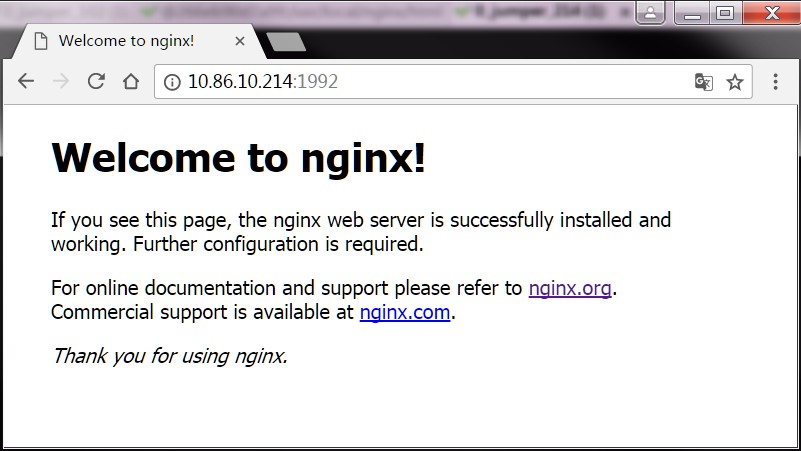
4. 管理数据
/usr/local/nginx/html
错误的挂载
-bash-4.2# docker run -it --rm -p 1992:80 --name mynginx -v ./:/usr/local/nginx/html mynginx:v1.0.0
docker: Error response from daemon: create ./: "./" includes invalid characters for a local volume name, only "[a-zA-Z0-9][a-zA-Z0-9_.-]" are allowed. If you intented to pass a host directory, use absolute path.
See 'docker run --help'.
正确的挂载
-bash-4.2# pwd
/home/yvhqbat/docker/nginx_docker
-bash-4.2# docker run -it --rm -p 1992:80 --name mynginx -v /home/yvhqbat/docker/nginx_docker:/usr/local/nginx/html mynginx:v1.0.0
5. Docker 镜像的 save & load
-bash-4.2# docker image --help

Usage:  docker image COMMAND

Manage images

Options:
      --help   Print usage

Commands:
  build       Build an image from a Dockerfile
  history     Show the history of an image
  import      Import the contents from a tarball to create a filesystem image
  inspect     Display detailed information on one or more images
  load        Load an image from a tar archive or STDIN
  ls          List images
  prune       Remove unused images
  pull        Pull an image or a repository from a registry
  push        Push an image or a repository to a registry
  rm          Remove one or more images
  save        Save one or more images to a tar archive (streamed to STDOUT by default)
  tag         Create a tag TARGET_IMAGE that refers to SOURCE_IMAGE

Run 'docker image COMMAND --help' for more information on a command.
-bash-4.2# docker image save --help

Usage:  docker image save [OPTIONS] IMAGE [IMAGE...]

Save one or more images to a tar archive (streamed to STDOUT by default)

Options:
      --help            Print usage
  -o, --output string   Write to a file, instead of STDOUT
-bash-4.2# docker image save -o mynginx.tar mynginx:v1.0.0

-bash-4.2# ls
mynginx.tar
-bash-4.2# docker image load --help

Usage:  docker image load [OPTIONS]

Load an image from a tar archive or STDIN

Options:
      --help           Print usage
  -i, --input string   Read from tar archive file, instead of STDIN
  -q, --quiet          Suppress the load output
-bash-4.2# docker image load -i mynginx.tar
4d887ff0a2a6: Loading layer [==================================================>] 19.83 MB/19.83 MB
f5ee131f11bf: Loading layer [==================================================>] 19.82 MB/19.82 MB
Loaded image: mynginx:v1.0.0
-bash-4.2# docker image ls
REPOSITORY               TAG                 IMAGE ID            CREATED             SIZE
mynginx                  v1.0.0              571fee6b44d1        3 hours ago         239 MB