JDBC
1.数据库驱动
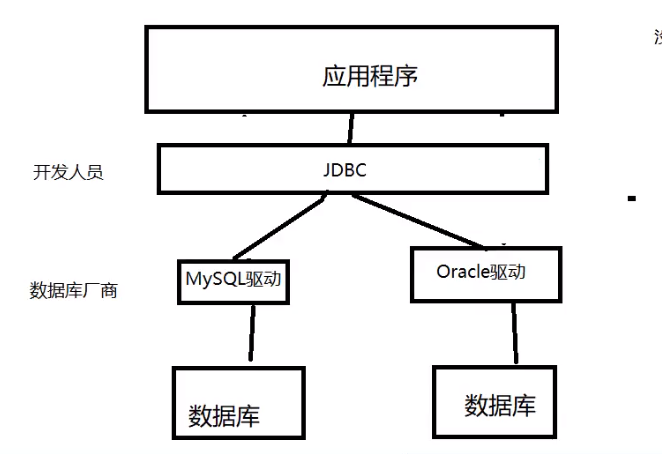
应用程序和数据库无法直接挂钩,所以就需要一个驱动。这个驱动是由数据库厂商提供的。
每个数据库都有一个对应的驱动。
2.JDBC
SUN公司为了简化数据的操作,提供了一个规范,俗称jdbc。
jdbc是驱动和驱动之间的部分。这里用5.1.47的驱动版本。
https://www.mvnjar.com/mysql/mysql-connector-java/5.1.47/detail.html
3.第一个JDBC
问题
- 创建bin包,导入jar包,右键添加到库中、
- 首先创建一个数据库,并且创建一个表插入一些数据
链接数据库步骤:
- 加载驱动
- 用户信息和数据库url(三个参数来避免奇怪的异常)
- 连接成功,返还数据库对象
- 执行SQL对象
- 执行SQL的对象,去执行SQL,可能存在结果(返回结果集)
- 释放连接
问题:

原因:连接数据库的顺序必须是url,user,password。顺序反了不可以。
package JDBCTest;
import java.sql.*;
public class JdbcDemo01 {
    public static void main(String[] args) throws ClassNotFoundException, SQLException {
        //1.加载数据库驱动
        Class.forName ("com.mysql.jdbc.Driver");
        //2.用户名,地址,密码
        String user = "root";
        String password = "123456";
        String url = "jdbc:mysql://localhost:3306/school?useUnicode=true&characterEncoding=utf8&useSSL=true";
        //3.获取数据库连接
        Connection connection = DriverManager.getConnection (url,user,password);
        //4.获取sql语句对象
        Statement statement = connection.createStatement ();
        //5。使用的sql语句
        String sql = "select * from studentInfo";
        //6.执行SQL语句,获取结果集
        ResultSet resultSet = statement.executeQuery (sql);
        while (resultSet.next ()){
            System.out.println ("学生的id"+resultSet.getObject ("id"));
            System.out.println ("学生的姓名"+resultSet.getObject ("name"));
            System.out.println ("学生的号码"+resultSet.getObject ("phoneNum"));
            System.out.println ("学生的地址"+resultSet.getObject ("address"));
        }
        connection.close ();
        statement.close ();
        resultSet.close ();
    }
}
connection对象可以执行很多操作。
statement执行sql对象。
ResultSet只有查询才有。ResultSet.beforeFirst();ResultSet.afterLast();移动迭代时候的光标
statement对象
问题:
- statement的作用?
- 它的方法有哪些
- 数据库解耦操作?工具类&配置properties
1.配置db.properties。在文件最底层目录下
driver=com.mysql.jdbc.Driver
url=jdbc:mysql://localhost:3306/school?useUnicode=true&characterEncoding=utf8&useSSL=true
username=root
password=123456
2.设置Utils包设置JdbcUtils类来解耦。封装,插入,删除,更新等算法
package JDBCTest.utils;

import java.io.IOException;
import java.io.InputStream;
import java.sql.*;
import java.util.Properties;

public class JdbcUtils {
    private static String driver = null;
    private static String url = null;
    private static String username = null;
    private static String password = null;
    static {
        try{
            InputStream in = JdbcUtils.class.getClassLoader ().getResourceAsStream ("db.properties");
            Properties properties = new Properties ();
            properties.load (in);

            driver = properties.getProperty ("driver");
            url = properties.getProperty ("url");
            username = properties.getProperty ("username");
            password = properties.getProperty ("password");

            Class.forName (driver);
        } catch (IOException | ClassNotFoundException e) {
            e.printStackTrace ();
        }
    }
    //获取连接
    public static Connection getConnection() throws SQLException {
        return DriverManager.getConnection (url,username,password);
    }
    //释放资源
    public static void release(Connection connection, Statement statement, ResultSet resultSet){
        if(resultSet!=null){
            try {
                resultSet.close ();
            } catch (SQLException e) {
                e.printStackTrace ();
            }
        }
        if(statement!=null){
            try {
                statement.close ();
            } catch (SQLException e) {
                e.printStackTrace ();
            }
        }
        if(connection!=null){
            try {
                connection.close ();
            } catch (SQLException e) {
                e.printStackTrace ();
            }
        }

    }
}
封装删除语句
package JDBCTest.utils;

import java.sql.Connection;
import java.sql.ResultSet;
import java.sql.SQLException;
import java.sql.Statement;

public class TestDelete {
    public static void main(String[] args) {
        Connection connection = null;
        Statement statement = null;
        ResultSet resultSet = null ;
        try{
            connection = JdbcUtils.getConnection ();
            statement=connection.createStatement ();
            String sql =" DELETE FROM `school`.`studentinfo` WHERE `id` = '100001'";
            int i = statement.executeUpdate (sql);
            if (i>0){
                System.out.println ("删除成功!");
            }
        } catch (SQLException e) {
            e.printStackTrace ();
        }finally {
            JdbcUtils.release (connection,statement,resultSet);
        }


    }
}
封装插入语句
public static void main(String[] args) {
    Connection connection = null;
    Statement statement = null;
    ResultSet resultSet = null ;
    try{
        connection = JdbcUtils.getConnection ();
        statement=connection.createStatement ();
        String sql ="INSERT INTO `school`.`studentinfo` (`id`, `name`, `phoneNum`, `address`) VALUES ('10002', 'BigFace', '10000', '安徽六安')";
        int i = statement.executeUpdate (sql);
        if (i>0){
            System.out.println ("插入成功!");
        }
    } catch (SQLException e) {
        e.printStackTrace ();
    }finally {
        JdbcUtils.release (connection,statement,resultSet);
    }
}
封装更新语句
package JDBCTest.utils;

import java.sql.Connection;
import java.sql.ResultSet;
import java.sql.SQLException;
import java.sql.Statement;

public class TestUpdate {
    public static void main(String[] args) {
        Connection connection = null;
        Statement statement = null;
        ResultSet resultSet = null;
        try{
            connection = JdbcUtils.getConnection ();
            statement =connection.createStatement ();
            String sql = "UPDATE `school`.`studentinfo` SET `phoneNum` = '10010' WHERE `id` = '10002' ";
            int i = statement.executeUpdate (sql);
            if (i>0){
                System.out.println ("更新数据成功!");
            }
        } catch (SQLException e) {
            e.printStackTrace ();
        }finally {
            JdbcUtils.release (connection,statement,resultSet);
        }
    }
}
SQL注入
利用字符串拼接,来获取数据库全部输入而绕过登录
https://baike.baidu.com/item/sql%E6%B3%A8%E5%85%A5/150289?fr=aladdin
package JDBCTest.utils;
import java.sql.Connection;
import java.sql.ResultSet;
import java.sql.SQLException;
import java.sql.Statement;
public class SqlInjectionAttack {
    public static void login(String username,String password){
        Connection connection = null;
        Statement statement = null;
        ResultSet resultSet = null ;
        try{
            connection = JdbcUtils.getConnection ();
            statement=connection.createStatement ();
            //  SELECT * FROM `studentinfo` WHERE `name`='李欢欢' AND `phoneNum`=10086

            String sql ="SELECT * FROM `studentinfo` WHERE `name`='"+username+"' AND `password`='"+password+"'";
            resultSet=statement.executeQuery (sql);
            while (resultSet.next ()){
                System.out.println (resultSet.getString ("name"));
                System.out.println (resultSet.getString ("password"));
            }
        } catch (SQLException e) {
            e.printStackTrace ();
        }finally {
            JdbcUtils.release (connection,statement,resultSet);
        }

    }
    public static void main(String[] args) {
       // login("李欢欢","10000");
      //  SELECT * FROM `studentinfo` WHERE `name`='李欢欢' or '1=1'  AND `password=10000
        login (" 'or '1=1"," 'or'1=1");
    }
}
PreparedStatement对象
- 预编译SQL语句
- Java date类转换成mysql date类
- 避免SQL注入
- 当复习到这里的时候,重写一个更新语句!!!!
优点:避免了SQL注入攻击,效率更高,更安全
重写了删除语句
package JDBCTest;

import JDBCTest.utils.JdbcUtils;

import java.sql.*;

public class TestDelete1 {
    public static void main(String[] args) {
        Connection connection = null;
        PreparedStatement preparedStatement = null;
        try{//使用preparedStatement重写
            //1.获取数据库连接
            connection = JdbcUtils.getConnection ();
            //2.编译sql语句,使用占位符
            String sql = " DELETE FROM `school`.`studentinfo` WHERE `id` = ?";
            //3.获取PreparedStatement对象,预编译sql
            preparedStatement = connection.prepareStatement (sql);
            //4.手动设置值
            preparedStatement.setInt (1,10000);
            //5。执行sql
            int i = preparedStatement.executeUpdate ();
            if (i>0){
                System.out.println ("删除成功!");
            }
        } catch (SQLException e) {
            e.printStackTrace ();
        }finally {
            JdbcUtils.release (connection,preparedStatement,null);
        }
    }
}
重写了插入语句
package JDBCTest;

import JDBCTest.utils.JdbcUtils;

import java.sql.*;

public class TestInsert1 {
    public static void main(String[] args) {
        Connection connection = null;
        PreparedStatement preparedStatement = null;
        try{
            connection = JdbcUtils.getConnection ();
            //1.获取sql语句
            String sql ="INSERT INTO `school`.`studentinfo` (`id`, `name`, `phoneNum`, `address`,`password`) VALUES (?,?,?,?,?)";
            //2.预编译sql
            preparedStatement = connection.prepareStatement (sql);
            //3.手动设置值
            preparedStatement.setInt (1,10099);
            preparedStatement.setString (2,"dashadan");
            preparedStatement.setString (3,"19880281");
            preparedStatement.setString (4,"北京市");
            preparedStatement.setString (5,"Jhj1000");
            //执行sql语句
            int i = preparedStatement.executeUpdate ();
            if (i>0){
                System.out.println ("插入成功!");
            }
        } catch (SQLException e) {
            e.printStackTrace ();
        }finally {
            JdbcUtils.release (connection,preparedStatement,null);
        }
    }
}