1.设置core文件大小
列出所有资源的限制: ulimit -a
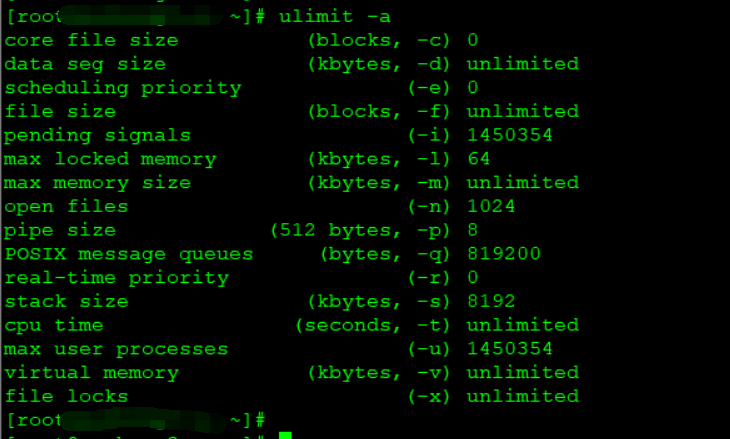
或者查看core file size: ulimit -c
core file size:
unlimited:core文件的大小不受限制
0:程序出错时不会产生core文件
1024:代表1024k,core文件超出该大小就不能生成了
设置core文件大小: ulimit -c fileSize
注意:
尽量将这个文件大小设置得大一些,程序崩溃时生成Core文件大小即为程序运行时占用的内存大小。可能发生堆栈溢出的时候,占用更大的内存
2.设置core文件的名称和文件路径
默认生成路径:输入可执行文件运行命令的同一路径下
默认生成名字:默认命名为core。新的core文件会覆盖旧的core文件
a.设置pid作为文件扩展名
1:添加pid作为扩展名,生成的core文件名称为core.pid
0:不添加pid作为扩展名,生成的core文件名称为core
修改 /proc/sys/kernel/core_uses_pid 文件内容为: 1
修改文件命令: echo "1" > /proc/sys/kernel/core_uses_pid
或者
sysctl -w kernel.core_uses_pid=1 kernel.core_uses_pid = 1
b. 控制core文件保存位置和文件名格式
修改文件命令: echo "/corefile/core-%e-%p-%t" > /proc/sys/kernel/core_pattern
或者:
sysctl -w kernel.core_pattern=/corefile/core.%e.%p.%s.%E
可以将core文件统一生成到/corefile目录下,产生的文件名为core-命令名-pid-时间戳
以下是参数列表:
%p - insert pid into filename 添加pid(进程id)
%u - insert current uid into filename 添加当前uid(用户id)
%g - insert current gid into filename 添加当前gid(用户组id)
%s - insert signal that caused the coredump into the filename 添加导致产生core的信号
%t - insert UNIX time that the coredump occurred into filename 添加core文件生成时的unix时间
%h - insert hostname where the coredump happened into filename 添加主机名
%e - insert coredumping executable name into filename 添加导致产生core的命令名
3.测试是否能生成core文件
kill -s SIGSEGV $$
查看/corefile目录下是否生成了core文件
4.调试core文件
Eg. test.c
#include<stdio.h>
int main()
{
int *p = NULL;
*p = 0;
return 0;
}
root@ubuntu:~# gcc -o test test.c
root@ubuntu:~# ./test
Segmentation fault (core dumped)
bingo:这里出现段错误并生成core文件了
在/corefile目录下发现core-test-31421-1476266571
开始调试
gdb ./test core-test-31421-1476266571
根据堆栈信息查看bug
5. 基本GDB命令
为了定位问题,常常需要进行单步跟踪,设置断点之类的操作。
下边列出了GDB一些常用的操作。
启动程序:run
设置断点:b 行号|函数名
删除断点:delete 断点编号
禁用断点:disable 断点编号
启用断点:enable 断点编号
单步跟踪:next (简写 n)
单步跟踪:step (简写 s)
打印变量:print 变量名字 (简写p)
设置变量:set var=value
查看变量类型:ptype var
顺序执行到结束:cont
顺序执行到某一行: util lineno
打印堆栈信息:bt