iOS的风格和Apple其他产品一样,简单而粗暴。没有给人其他选择的余地,让你又爱又恨。同样的,Apple对待iOS平台的开发人员和对待大众消费者一样,也不给你留余地。UIAlertView就是一个鲜明标志。功能简单,甚至单一,定制性差,消耗资源。在资源紧张的设备上,UIAlertView的动画效果都会稍微卡一下,很是别扭。
这时还是很希望在iOS上有一个Android风格的Toast控件。
终于http://code.google.com/p/toast-notifications-ios/发布了这样的控件。在这里和大家分享一下。
我制作了一个demo,使用起来感觉效果还是很不错的。
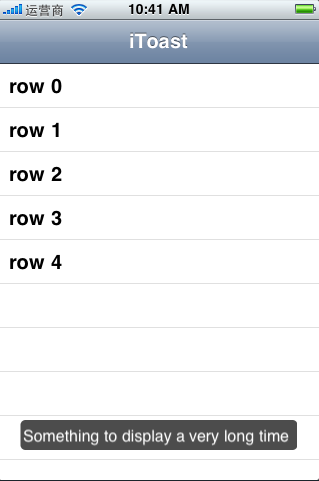
这个类的接口设计如下:
|
#import <Foundation/Foundation.h> #import <UIKit/UIKit.h>
typedef enum iToastGravity { iToastGravityTop = 1000001, iToastGravityBottom, iToastGravityCenter }iToastGravity;
enum iToastDuration { iToastDurationLong = 10000, iToastDurationShort = 1000, iToastDurationNormal = 3000 }iToastDuration;
typedef enum iToastType { iToastTypeInfo = -100000, iToastTypeNotice, iToastTypeWarning, iToastTypeError }iToastType;
@class iToastSettings;
@interface iToast : NSObject { iToastSettings *_settings; NSInteger offsetLeft; NSInteger offsetTop;
NSTimer *timer;
UIView *view; NSString *text; }
- (void) show;
- (iToast *) setDuration:(NSInteger ) duration; - (iToast *) setGravity:(iToastGravity) gravity offsetLeft:(NSInteger) left offsetTop:(NSInteger) top; - (iToast *) setGravity:(iToastGravity) gravity; - (iToast *) setPostion:(CGPoint) position;
+ (iToast *) makeText:(NSString *) text;
-(iToastSettings *) theSettings;
@end
===The interface of the SharedSettings ===
@interface iToastSettings : NSObject<NSCopying>{ NSInteger duration; iToastGravity gravity; CGPoint postition; iToastType toastType;
NSDictionary *images;
BOOL positionIsSet; }
@property(assign) NSInteger duration; @property(assign) iToastGravity gravity; @property(assign) CGPoint postition; @property(readonly) NSDictionary *images;
- (void) setImage:(UIImage *)img forType:(iToastType) type; + (iToastSettings *) getSharedSettings;
@end |
从接口上看,可以设置风格和显示时间,显示位置等,但是从实现代码上看是图片显示只是预留的接口,尚未实现。其显示的位置在设备旋转时也没有进行处理,没有进行横屏等其他方向的显示控制。
简单的调用
|
[[iToast makeText:NSLocalizedString(@"The activity has been successfully saved.", @"")] show]; |
设置显示位置
|
[[[iToast makeText:NSLocalizedString(@"The activity has been successfully saved.", @"")] setGravity:iToastGravityBottom] show]; |
设置显示位置和显示时长类型
|
[[[[iToast makeText:NSLocalizedString(@"Something to display a very long time", @"")] setGravity:iToastGravityBottom] setDuration:iToastDurationLong] show]; |